
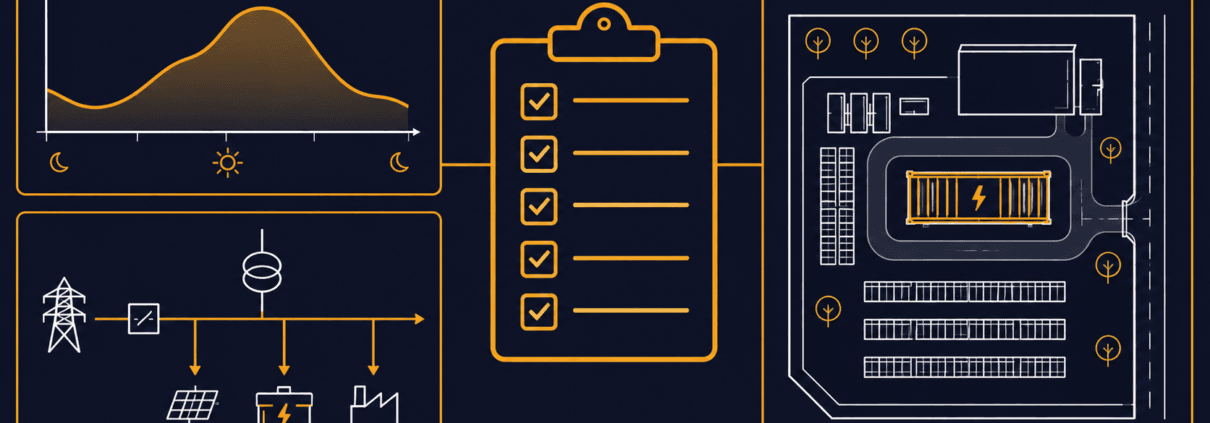
How to Prepare for a C&I BESS Quote
A C&I BESS quote is only as useful as the information behind it. In fact, a one-line request rarely supports reliable sizing or a comparable installed-price estimate.
Send your load data, tariff details, site facts, and main goal up front. Then every bidder answers the same question.
This guide covers the data, documents, and questions to prepare. Finally, it offers a request email you can copy and send.
Quick Answer: To request a C&I BESS quote, state your application, site location, target operating date, and available electrical and space details. Next, add interval load data and the tariff for savings-based projects, or critical loads and backup duration for resilience. Finally, share a single-line diagram if you have one.
Why a Generic C&I BESS Quote Is Not Enough
Asking what a 1 MWh system costs does not produce a project-ready C&I BESS quote. That is because installed cost depends on far more than battery size.
- Energy duration and power rating
- The application the battery must serve
- Interconnection and controls
- Site civil work and safety systems
- Commissioning and warranty requirements
Each item changes the price. So a bare price request tells a supplier very little.
Similarly, the U.S. Department of Energy’s BESS procurement checklist shows the same idea. It gives federal agencies early-stage tasks, questions, and reference points, not just a price request.
To see how these cost drivers add up, read SunLith’s BESS CAPEX vs LCOS guide. Meanwhile, the BESS OPEX and operating cost model and Cost of Storing Energy: BESS guides cover the rest.
Quote preparation brings together the application, preliminary sizing, specifications, warranty requirements, and economic assumptions. However, you can refine these inputs with the supplier as the project develops.
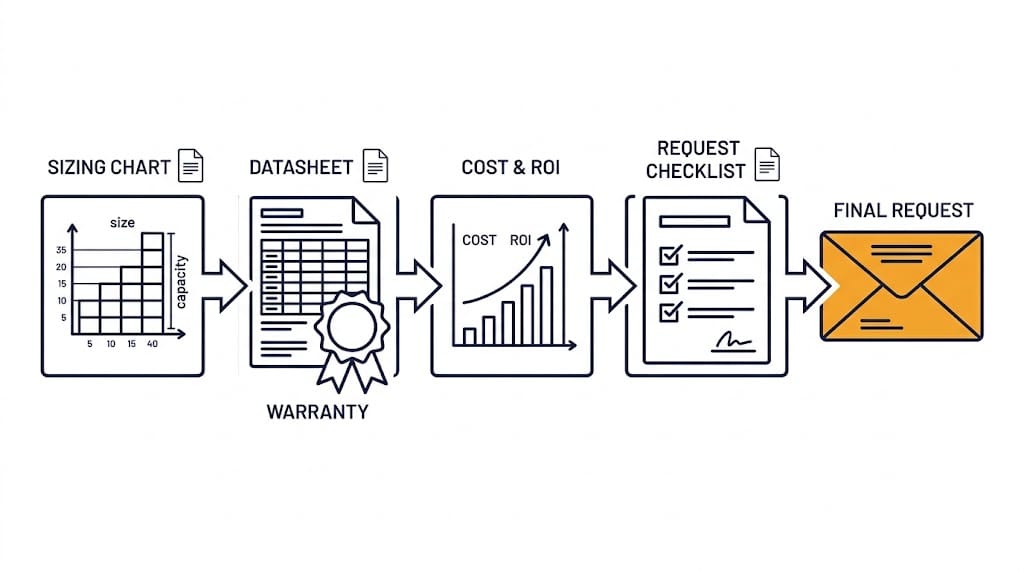
Start Your C&I BESS Quote With the Application
Every C&I BESS quote starts with the job the battery must do. Because each job needs different data, the table below separates them.
| Primary application | Essential information |
| Peak shaving | Interval load data, tariff, target grid-import limit, demand-charge structure |
| Backup / resilience | Critical-load list, required backup duration, transfer scheme, outage history, generator interface |
| Solar self-consumption | PV system size, production data, export rules, load profile, curtailment information |
| EV charging | Charger count, charger power, utilization, transformer capacity, future expansion plan |
| Microgrid / generator replacement | Generator ratings, fuel use, load steps, operating schedule, islanding requirements |

First, pick the row that fits your main goal. Then gather everything listed beside it.
For peak shaving, follow the steps in SunLith’s peak shaving battery sizing guide. For backup, try the backup-power battery sizing calculator instead.
If you have more than one goal, rank them. Otherwise, a system tuned for one job may perform poorly at another.
Prepare the Data Behind Your C&I BESS Quote
Three groups of information shape every C&I BESS quote request. Since each group answers a different supplier question, gather all three.
Energy and Tariff Information
For peak shaving and tariff-based savings analysis, aim for at least 12 consecutive months of interval data where available.
Use the utility’s demand-measurement interval, or finer data that can be aggregated to it. Also state the timestamps, time zone, units, and whether each reading is average kW or interval kWh.
- Current utility bills
- The full tariff or rate schedule
- Demand charges, time-of-use windows, ratchets, and export compensation rules
- Existing and planned solar generation data
Electrical and Site Information
- Facility location and utility
- Main-service voltage, transformer rating, and available capacity
- Single-line diagram, where available
- Existing switchgear, protection equipment, generator, and solar-inverter details
- Proposed point of interconnection
- Site plan, access route, usable footprint, setbacks, and fire-access constraints
Operational and Commercial Information
- Main BESS use case and priority order
- Target kW reduction, backup duration, or EV-charging demand
- Typical operating schedule and seasonal changes
- Expansion plans
- Desired commercial-operation date
- Budget range, procurement route, and financing preference, if you are willing to share them
Missing a document? Send what you have. Then the supplier can list the gaps and request the rest later.
What Suppliers Should Include in Their Reply
A budgetary estimate may give an indicative configuration, price range, scope, and assumptions without detailed engineering. In contrast, a developed proposal should add a more defined layout, electrical interface, commissioning scope, and itemized exclusions.
State which stage you are requesting. Also ask suppliers to flag anything that still depends on site investigation or engineering.
A strong C&I BESS quote does more than state a price. Next, ask each bidder to cover these items.
- Proposed AC power rating, usable energy, and nominal energy
- Stated duration at rated power
- Assumed measurement boundary for capacity and efficiency
- Scope of PCS, battery, BMS, EMS, HVAC, fire-safety, enclosure, and balance-of-system equipment
- Interconnection and site-work assumptions
- Conceptual layout and electrical-interface information, where available; more detailed drawings at the developed-proposal stage
- Performance assumptions and dispatch limitations
- Warranty scope, capacity retention, throughput limit, exclusions, and remedies
- CAPEX breakdown, exclusions, O&M scope, and optional services
- Schedule, commissioning plan, and commercial assumptions
- Quote validity, currency, delivery basis, taxes or duties, payment milestones, and major price-adjustment conditions
Once bids arrive, use SunLith’s C&I BESS warranty checklist to review each warranty offer.
Because unclear terms make bids hard to compare, read SunLith’s guide to understanding BESS specifications. It explains how vendors define capacity, power, and efficiency.
Also ask how the supplier plans for capacity loss over time. Our guide to BESS augmentation planning covers that topic.
Questions to Compare Across Every C&I BESS Quote
Use these questions to put every C&I BESS quote on the same footing. Ask for written answers as well, and have important assumptions, inclusions, and exclusions written into the proposal.
Capacity and Performance Questions
- Is the energy rating nominal, usable DC, AC delivered, or measured at the point of interconnection?
- What duration does the system provide at rated power?
- Does the proposal assume one application or stacked value streams?
- How are HVAC and auxiliary loads counted in efficiency and available-energy assumptions?
Scope and Ownership Questions
- Which site upgrades, civil works, interconnection studies, permits, or fire-protection measures are excluded?
- Who owns the EMS controls, performance monitoring, and data access?
- What do commissioning, acceptance testing, training, remote monitoring, and maintenance include?
Warranty and Lifecycle Questions
- Which warranty limits apply to DoD, throughput, C-rate, SOC, temperature, and dispatch?
- What annual O&M and replacement costs are assumed?
- What must happen for capacity augmentation, and who pays for it?
Because C-rate limits often sit inside warranty terms, see BESS C-rate explained for how those limits work.
Common Mistakes When Requesting a Quote
These errors often weaken a C&I BESS quote request. If you avoid them, your bids will be easier to compare.
- Requesting price without an application: As a result, the supplier must make assumptions about the required kW, kWh, and controls.
- Sharing one monthly utility bill: Because it hides peak shape, duration, and seasonal change, sizing stays uncertain.
- Comparing nominal kWh with usable AC energy: Since the two numbers measure different things, the bids will not match.
- Ignoring tariff and demand-charge rules: When you miss them, the value of every kW you cut is unclear.
- Assuming extras are included: Unless stated, PCS, HVAC, fire protection, controls, and civil work may sit outside the price.
- Comparing warranty years alone: Instead, check throughput and operating limits as well as the term.
- Asking for a system sized for savings: Without sufficient load, tariff, and site information, savings-based sizing remains speculative.
Copy-and-Paste RFQ Email Template
Use this template to start your C&I BESS quote request. Replace each bracketed item with your own details before sending.
Subject: Request for preliminary C&I BESS assessment and budgetary quote
We are evaluating a battery energy storage system for [facility type] at [location]. Our primary objective is [peak shaving / backup / solar self-consumption / EV charging / other].
Attached are [interval load data / utility bills / tariff / single-line diagram / site plan].
Please provide a preliminary recommendation. Include proposed AC power, usable energy, expected duration, and key assumptions.
Also include required site or interconnection work, budgetary CAPEX, warranty summary, delivery schedule, and information needed for a detailed proposal.
Our target decision date is [date], and our target commercial-operation date is [date].
Send it to more than one supplier. Also use the same attachments each time.
Frequently Asked Questions About a C&I BESS Quote
When buyers prepare a C&I BESS quote request, the same questions come up often.
What data do I need for a C&I BESS quote?
Start with your application, site location, available electrical information, and target operating date. For peak shaving or tariff-based savings, include interval load data and the utility tariff.
For backup, provide critical-load requirements and the required backup duration. In addition, a single-line diagram and site plan help refine the proposal where available.
Can I get a C&I BESS quote with only one utility bill?
You may receive a budgetary estimate, but its sizing and savings assumptions will be limited. That is because one bill hides peak shape and seasonal change. Instead, interval data gives a far better basis.
Why do C&I BESS quotes differ so much?
Bids often use different definitions and scope. For example, one may quote nominal energy and another usable AC energy. Therefore, ask every bidder to state its assumptions.
Do I need a single-line diagram before I ask?
It helps, but it is not always required. If you lack one, send equipment nameplate details and photos of the main switchgear. As a result, the supplier can request more later.
Is a preliminary assessment the same as a final proposal?
No. A preliminary assessment gives budgetary figures and stated assumptions. However, a detailed proposal needs site-specific electrical, tariff, interconnection, and safety review.
Ready to Request a Preliminary Assessment?
Contact SunLith for a C&I BESS quote with your project objective, site location, and available load, tariff, and electrical information. If documents are missing, explain what you have so we can identify the next steps.
Request a Preliminary C&I BESS Assessment
SunLith can provide a preliminary assessment; final system design requires site-specific electrical, tariff, interconnection, and safety review.
Related BESS Procurement Guides
While you prepare a C&I BESS quote request, these SunLith guides support each step.
- Peak Shaving Battery Sizing — the kW and kWh method behind a peak-shaving request
- C&I BESS Sizing Calculator — preliminary outage-backup sizing, not peak shaving
- Understanding BESS Specifications — how vendors define capacity, power, and efficiency
- BESS CAPEX vs LCOS — why upfront cost and lifetime cost differ
- BESS OPEX and Operating Cost Model — the recurring costs behind every proposal
- Cost of Storing Energy: BESS LCOS Calculator Guide — how lifetime cost per kWh is calculated
- C&I BESS Warranty Guide — how to read warranty terms before you sign
- BESS Augmentation — planning for capacity loss over time
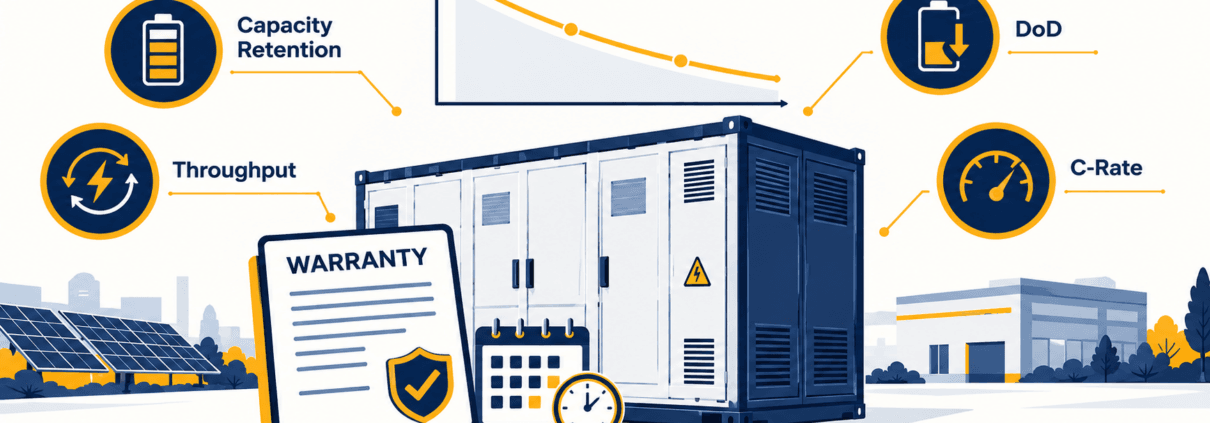
How to Read a C&I BESS Warranty Before You Buy
A C&I BESS warranty is not just a number of years. It is a contract that guarantees performance only inside a defined operating envelope.
That envelope covers capacity, throughput, depth of discharge, C-rate, and temperature. However, operating outside a stated limit may reduce coverage or affect a claim, depending on the contract terms and the documented cause of the issue.
First, this guide shows how to read each term before you sign. It also ties the warranty back to your peak-shaving BESS sizing, so the system can still meet your kW and kWh needs late in life.
⚡ Quick Answer: A C&I BESS warranty is more than a number of years. It is a set of performance promises that apply only within defined operating limits. So check guaranteed capacity, throughput, depth of discharge, C-rate, temperature, test method, exclusions, and the remedy before you compare suppliers.
What a C&I BESS Warranty Actually Covers
A C&I BESS warranty usually bundles several separate promises. Scope, duration, and exclusions vary by supplier and contract, so read each promise on its own.
- Product or defect warranty: covers faulty parts and manufacturing defects.
- Capacity-retention warranty: guarantees a minimum state of health (SoH) at set points in time.
- Throughput or cycle-life warranty: limits the total energy or cycles the system may process.
- Performance warranty: may add an efficiency commitment, depending on the contract.
- Workmanship warranty: covers installation quality when SunLith or an EPC provider supplies it.
- Subsystem coverage: identifies whether the PCS, EMS, BMS, HVAC, enclosure systems, and any supplied fire-detection or suppression equipment are covered, and for how long.
Also, each item can carry its own term, limits, and remedy. For example, a long cell warranty does not prove the PCS or cooling system is covered for as long.
C&I BESS Warranty Terms: Capacity Retention vs. Throughput
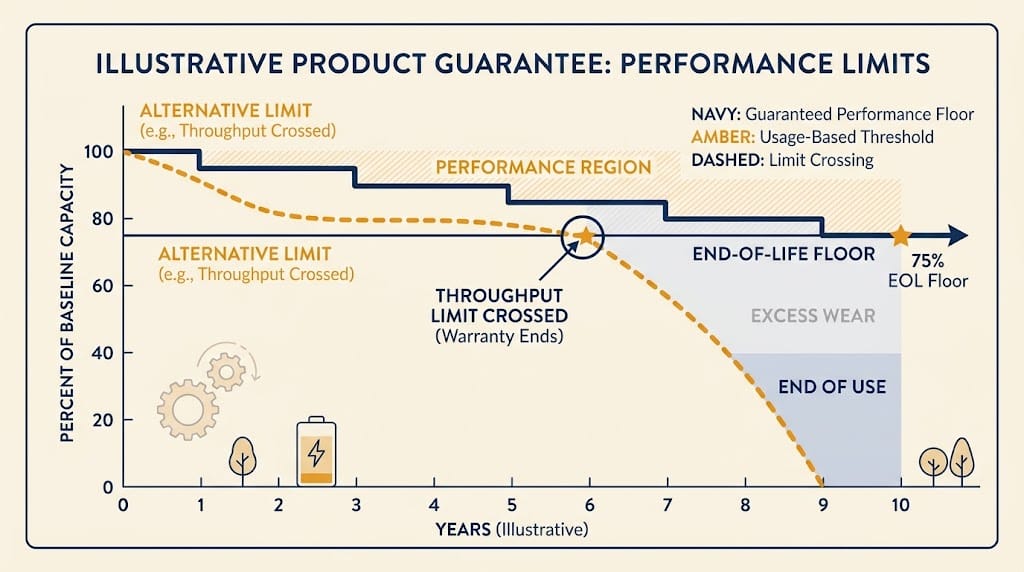
Most disputes over a C&I BESS warranty start with two terms. But capacity retention and throughput control very different things.
| Term | What it controls | Buyer question |
| Capacity retention / SoH | Remaining usable energy at a specified point in time | At what measurement boundary and operating conditions is capacity tested? |
| Throughput | Total permitted energy processed during the warranty | Is throughput counted one way, both ways, or as equivalent full cycles? |
| Equivalent full cycles | An accounting measure of throughput relative to capacity | What capacity denominator and counting method does the contract use? |
| End-of-life threshold | The contractual capacity floor at a stated year or throughput value | Does that floor still satisfy the project’s service obligation? |
Capacity Retention and State of Health
Capacity retention sets the minimum usable energy at a stated point in time. For example, a contract might guarantee 70% of baseline capacity at year 10 (illustration only).
First, the key issue is the measurement boundary. Capacity can be quoted at the cell, the DC bus, the PCS AC output, or the point of interconnection.
Because of this, each boundary gives a different number. Also confirm the beginning-of-life baseline, because a retention percentage means little without it.
Throughput and Equivalent Full Cycles
A throughput provision may limit the cumulative energy processed during the warranty. For example, some contracts count discharge only, while others count charge and discharge together.
Then equivalent full cycles convert that energy into a cycle count. The result depends on the capacity used as the denominator, so ask for the exact formula.
An open-access review in Energies discusses degradation models based on cumulative energy throughput. It also covers models that account for cycling conditions such as depth of discharge, state of charge, and temperature.
But contracts often use the simpler count. Your dispatch pattern still decides how fast the cells age, so learn how equivalent full cycles and throughput records are tracked in the BMS.
End-of-Life Thresholds
An end-of-life threshold is the contractual capacity floor a supplier agrees to support, subject to the stated terms. It applies at the year or throughput value that the contract names.
Then check that this floor still meets your service obligation. As a result, a battery can meet its warranty floor and still miss your load requirement.
Capacity fades on two clocks, time and use. See calendar and cycle aging for how each one works.
In addition, see SunLith’s battery degradation in BESS guide for the mechanisms and mitigation options behind capacity loss.
The Operating Envelope Behind Every C&I BESS Warranty
Every C&I BESS warranty rests on assumed operating conditions. As a result, if the site operates outside those conditions, coverage may be limited or a claim may be disputed under the contract.
A warranty can be technically valid but commercially unsuitable if the operating limits do not match the intended dispatch plan.
Charge, Discharge, and Depth Limits
First, list every electrical limit the contract sets. Typical items include:
- Maximum and minimum state of charge
- Permitted depth of discharge
- Charge and discharge C-rate
Throughput terms often carry a maximum C-rate clause as well. Then compare your peak discharge power against the BESS C-rate limit in the contract.
Time, Temperature, and Throughput Limits
Next, check the limits tied to time and environment:
- Temperature and humidity requirements
- Calendar limits versus cycling limits
- Annual or cumulative throughput limits
For example, many contracts specify that coverage ends when the first applicable limit is reached. So look for the phrase “whichever occurs first.”
Controls, Data, and Maintenance Duties
Finally, review what the owner must do to keep coverage intact:
- Follow the approved EMS settings and dispatch behavior
- Complete the required maintenance
- Keep connectivity, monitoring, and event logging active
However, missing data can make a claim hard to win. Our guide to evaluating a supplier’s BMS also explains SOH and throughput logging.
Why C&I BESS Warranty Terms Affect Peak-Shaving Design
Sizing sets your first kW and kWh requirement. The C&I BESS warranty then decides whether the system can keep meeting it.
Take the 100 kW / 278 kWh preliminary configuration in the peak-shaving guide. It illustrates how first-year power and energy requirements can be estimated for one defined peak event.
However, whether it can meet repeated events or retain enough capacity late in life depends on the operating plan and the warranty’s limits.
Next, here is a simple, hypothetical check. If a contract permits 3,000 equivalent full cycles, and the site uses one equivalent full cycle on each day it operates, daily cycling would reach that limit in about 8.2 years (3,000 ÷ 365).
But if the system uses one equivalent full cycle on only 150 days each year, it would take about 20 years to reach the same limit. Calendar limits may then determine when coverage ends.
Also, an equivalent full cycle is an energy measure, not a single dispatch event. These figures are illustrations, not market terms.
So check size and dispatch strategy against the warranted envelope, not just first-year savings. Warranty terms also feed your BESS OPEX and CAPEX vs LCOS assumptions, because lost throughput raises the cost of each delivered kWh.
C&I BESS Warranty Checklist for RFQs
First, use this C&I BESS warranty checklist in every request for quotation. Ask each supplier the same questions so the answers compare cleanly.
Capacity and Baseline Questions
- Is capacity measured as nameplate, usable DC, PCS AC, or energy at the point of interconnection?
- Which beginning-of-life capacity baseline applies?
- How much retained capacity is guaranteed at each year or throughput checkpoint?
- Which testing method verifies capacity, and under what site conditions?
Throughput and Operating Limit Questions
- Is there a calendar limit, cycle limit, throughput limit, or a “whichever occurs first” condition?
- How is throughput counted: charging, discharging, both directions, or equivalent full cycles?
- What DoD, C-rate, temperature, SOC range, and dispatch pattern does the warranty assume?
- How is an equivalent full cycle calculated and logged?
Scope, Exclusion, and Remedy Questions
- Which components are included: cells, modules, racks, BMS, PCS, HVAC, EMS, enclosure systems, and any supplied fire-detection or suppression equipment?
- Which exclusions can reduce or invalidate coverage?
- What data must the owner retain to support a claim?
- If the system misses a warranted value, what is the remedy: repair, replacement, payment, capacity augmentation, or another remedy? Who pays for labor, logistics, downtime, testing, and recommissioning?
Also, pair this list with our guide on how to compare BESS specifications for datasheet items.
Since the remedy may be added capacity, plan that work early. Our guide to BESS augmentation planning explains how lost capacity is restored.
Common Mistakes When Comparing Warranty Bids
Buyers often repeat the same errors when they compare bids. Next, avoid these five:
- Comparing years alone: two bids with equal terms can carry very different limits.
- Ignoring the measurement boundary: a DC figure and an AC figure are not the same promise.
- Assuming equal throughput counting: one bid may count discharge only, another both directions.
- Skipping the dispatch check: the warranty may not fit your real duty cycle.
- Accepting a vague remedy: insist on clear timing, cost, and responsibility.
Frequently Asked Questions About a C&I BESS Warranty
These answers cover the questions buyers ask most about a C&I BESS warranty.
What does a C&I BESS warranty cover?
It usually covers defects, a capacity or state-of-health guarantee, and sometimes a throughput limit. Also, scope and duration vary by supplier and contract.
How do capacity retention and throughput differ?
Capacity retention sets a minimum usable energy at a point in time. Meanwhile, throughput caps the total energy the system may process during the warranty.
Can a C&I BESS warranty be valid but still unsuitable?
Yes, because if its limits on depth, C-rate, or throughput do not match your dispatch plan, the system can reach a contract limit early.
What is a BESS performance warranty?
A BESS performance warranty defines measurable commitments, such as usable capacity, capacity retention, energy throughput, availability, or efficiency, under specified test conditions and operating limits. The exact scope and remedy depend on the contract.
What is end of life in a BESS warranty?
It is the contractual capacity floor at a stated year or throughput value. Then confirm that it still covers your required kWh.
Who should review a BESS warranty before signing?
Your engineer, procurement lead, and legal counsel should each review it. SunLith can provide a preliminary specification review, but contract terms need qualified legal review.
Need a Preliminary Warranty Review?
Send us your datasheet and draft warranty terms. Then we will flag the limits that matter for your dispatch plan.
Request a preliminary BESS specification and warranty review
SunLith can provide a preliminary assessment. Final system design and contract terms require site-specific electrical, tariff, interconnection, safety, and legal review.
Further Reading on the C&I BESS Warranty and Related Costs
Also, use these guides alongside this C&I BESS warranty guide.
- How to Size a Battery for Peak Shaving
- Battery Degradation in BESS: Causes, Mechanisms & Mitigation
- BESS C-Rate Explained
- Calendar Aging vs. Cycle Aging in LFP Batteries
- Understanding BESS Specifications
- BESS Augmentation: The Complete Guide
- BMS Cycle Counting Explained
- How to Evaluate a BESS Supplier’s BMS
- BESS CAPEX vs LCOS
- BESS OPEX and Operating Cost Model
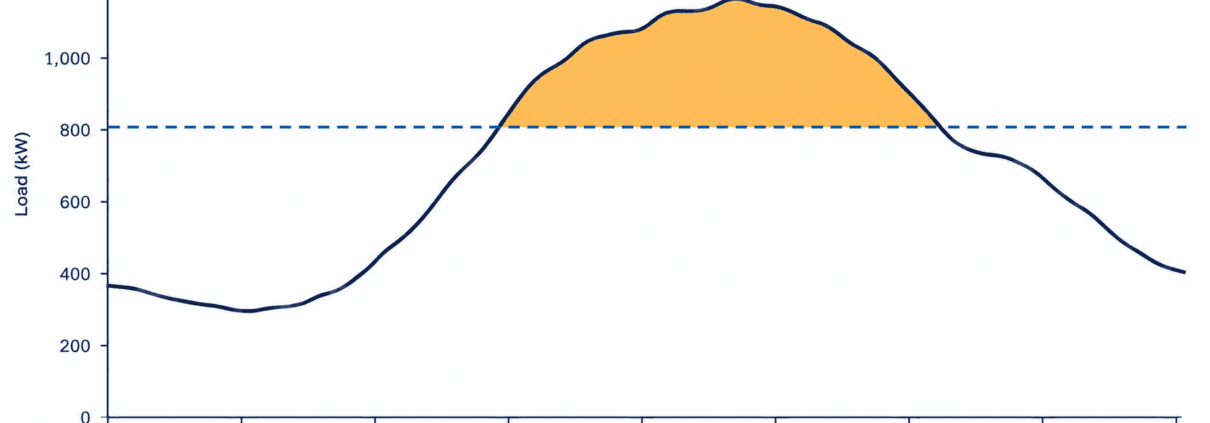
Peak Shaving Battery Sizing: kW and kWh Guide
Peak shaving battery sizing starts with two questions. How much power must the battery discharge? For how long? First, choose the maximum grid demand you want your facility to draw. Then analyze your interval load data. The highest load above that target sets the discharge power, in kW. The area above the target sets the delivered energy, in kWh.
Quick Answer
Peak-shaving battery sizing starts by subtracting the selected grid-demand target from site load in each interval. The highest result is the preliminary battery discharge-power requirement in kW. Add the interval discharge energy to estimate delivered kWh, then adjust for defined discharge efficiency and permitted usable capacity.
Those two numbers are only a starting point, though. A workable design must also account for discharge losses and the battery’s allowed operating range. It also needs to handle repeated peaks, charging opportunities, and how your utility calculates billed demand. Peak shaving means discharging a battery to cut peak grid demand. That is different from shifting energy use to another time, or sizing a battery for outage backup.
For a broader explanation of BESS components, operation, and applications, see SunLith’s Battery Energy Storage System (BESS) guide.
The Peak Shaving Battery Sizing Formulas at a Glance
Peak shaving battery sizing follows four simple steps for each interval in your load data. Confirm the measurement boundary, such as battery DC terminals, PCS AC output, or site meter, before applying efficiency assumptions.
New to these units? SunLith’s Ah vs Wh battery capacity guide covers the Wh = Ah × voltage relationship behind every kWh figure below.
Key Sizing Formulas
First, find the battery discharge required, in kW. Take site load, subtract the grid-demand target, and floor the result at zero. A 700 kW load against a 600 kW target needs 100 kW of discharge. A 550 kW load against the same target needs none.
Pbattery,i = max(0, Li − T)
Next, find the largest required discharge across every interval. That becomes your preliminary AC discharge-power requirement.
Prequired = maxi(Pbattery,i)
Then find the delivered energy, in kWh. Add up, across every interval in one peak event, the discharge required multiplied by the interval length in hours.
Edelivered = Σi(Pbattery,i × Δti)
Finally, estimate nominal battery capacity. Divide delivered energy by discharge efficiency, then by the usable fraction of nominal capacity. Discharge efficiency is the assumed efficiency from the battery’s energy boundary to the AC delivery point. The usable fraction is the share of nominal capacity available for this duty. Define both terms before you apply the formula, since this is only an event-level estimate. It is not a substitute for simulating state of charge over time.
Enominal = Edelivered ÷ (ηdischarge × fusable)
Where: Pbattery,i is the required battery discharge during interval i; Li is site load; T is the selected grid-demand target; Δti is interval duration in hours; ηdischarge is defined one-way discharge-path efficiency; and fusable is the permitted usable share of nominal capacity.
Step 1: Gather Load Data and the Tariff
First, ask your utility or metering provider for interval demand data covering representative operations and seasons. You need to see the shape of each peak, not just the highest number on a bill. A 100 kW exceedance lasting 15 minutes requires far less delivered energy than the same exceedance lasting three hours.
Also collect the tariff alongside the data. Identify the demand-measurement interval. Check which periods carry demand charges. Look for other billing provisions that affect the value of reducing a peak. The target should be based on how demand is measured and billed under the applicable tariff, not a generic assumption about demand charges.
One MDPI-published study of low-voltage commercial users evaluated battery energy capacity against measured customer-load data and the resulting peak reduction over time. The principle for a single facility is the same: use interval data rather than a monthly peak alone.
If the site has solar, use net demand at the relevant meter. Also model how solar output varies during likely peak events. A sunny-day profile alone may understate the battery needed on a cloudy day.
Step 2: Choose a Grid-Demand Target
Suppose a facility’s load sometimes reaches 700 kW. You could test targets of 650 kW, 600 kW, and 550 kW. Generally, a lower target asks the battery to provide more power, more energy, or both. However, whether that extra capacity pays off depends on the tariff and the full pattern of peaks.
Do not pick the target from the single highest reading alone. A battery might shave the largest peak successfully. Then it may exhaust its usable energy during a longer, lower peak later that day.
Step 3: Calculate Required Battery Power
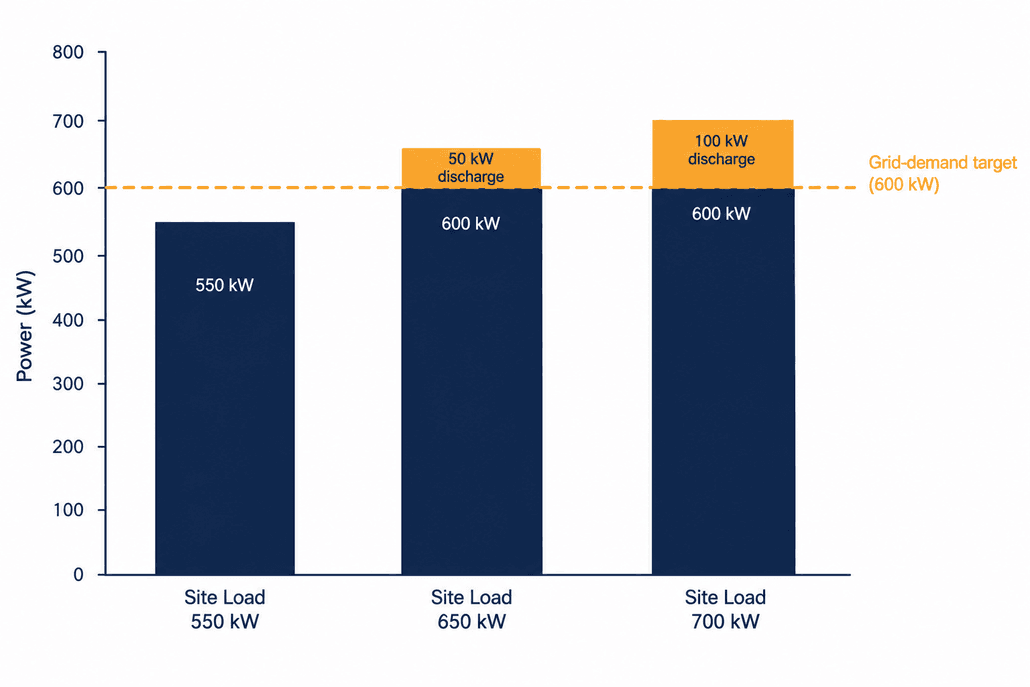
For each interval, subtract the target from site load. If the result is negative, set the discharge requirement to zero. The table below shows this for a 600 kW target.
Example: discharge needed to hold a 600 kW target
| Site load | Discharge needed to hold 600 kW |
| 550 kW | 0 kW |
| 650 kW | 50 kW |
| 700 kW | 100 kW |
The preliminary requirement here is 100 kW of AC discharge power, measured at the point where the battery offsets meter demand. An engineer must then confirm that the chosen power conversion system and installation can sustain that output under real operating conditions.
Step 4: Calculate the Delivered Energy for Each Peak
Power tells you how fast the battery must discharge, while energy tells you how much it must deliver over the whole event.
For preliminary analysis, define a peak event as consecutive metering intervals where site demand stays above the selected grid-demand target. If demand drops below the target and the battery can begin recharging, treat the next exceedance as a separate event. Verify that the available recharge time and charging-power limit are sufficient.
Assume the facility stays at 700 kW for one hour. Then it drops to 650 kW for two hours, still against a 600 kW target. That gives 100 kW for one hour, plus 50 kW for two hours. The total is 200 kWh delivered.
So this event requires 100 kW of maximum discharge and 200 kWh of delivered AC energy. A battery rated for 100 kW but able to deliver only 100 kWh would not cover the whole event at this target.
Repeat this calculation for other days and seasons. The event with the highest instantaneous discharge sets one constraint. The event with the greatest delivered energy may set the energy-capacity requirement.
Step 5: Estimate Nominal Battery Capacity
The battery must store more energy than it ultimately delivers. Discharge is not lossless, and the full nominal capacity may not be available for the chosen operating strategy.
For illustration, assume 200 kWh of required delivered energy. Assume a 90% one-way discharge-path efficiency and an 80% permitted usable fraction of nominal capacity. Divide 200 by 0.90, then by 0.80. That gives roughly 278 kWh of nominal capacity.
That figure is only an initial estimate, not a recommended product size. First, check the vendor’s capacity definition. Then account for state-of-charge limits, expected end-of-life capacity, temperature effects, auxiliary consumption, warranty commitments, and the manufacturer’s defined AC or DC capacity boundary before choosing a product.
Accounting for Discharge Losses vs. Round-Trip Efficiency
Do not treat round-trip efficiency as one-way discharge efficiency. Round-trip efficiency includes losses across both charging and discharging. Applying it as a discharge factor, then adding separate discharge losses on top, counts losses twice. A preliminary sizing tool may use round-trip efficiency as a simplified assumption. Final peak shaving battery sizing should still call out discharge-path losses on their own.
SunLith’s guide to understanding BESS specifications explains how vendors actually define usable capacity and efficiency, both needed for this step.
Step 6: Test Repeated Peaks and Recharging
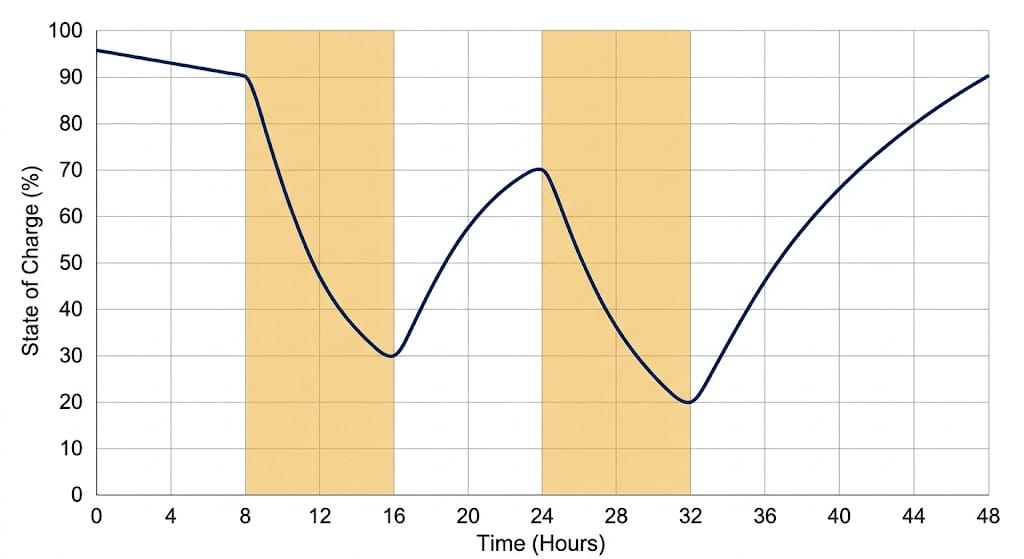
The example above assumes the battery has enough charge when the event begins. Real facilities may see several peaks a day, peaks on consecutive days, or an unusually long stretch above the target. Charging too aggressively can itself create a new metered peak.
Run the load profile forward, interval by interval, using these five steps.
- Begin with an assumed battery state of charge.
- Discharge whenever load would otherwise exceed the chosen target.
- Track remaining energy and all applicable losses.
- Allow charging only when it fits the tariff, site load, and equipment limits.
- Check whether the battery is ready for the next event.
This simulation may reveal that a seemingly adequate 100 kW / 278 kWh preliminary configuration needs more capacity. Or it may show that a different demand target produces a better project. Model peak-shaving dispatch and resulting bill impacts together this way, instead of inferring them from a single peak value.
Sample Interval-Data Worksheet Columns
A simple spreadsheet makes this simulation easier to run and easier to hand to an engineer. Track these six columns for every interval in the load dataset.
| Column | What it records |
| Timestamp | Date and interval start time |
| Site load (kW) | Measured or forecast demand for the interval |
| Target (kW) | The grid-demand target being tested |
| Discharge required (kW) | Site load minus target, floored at zero |
| Delivered energy (kWh) | Discharge required times interval hours |
| Simulated state of charge (%) | Running battery charge after each interval |
Step 7: Check Whether the Battery Size Makes Financial Sense
A technically workable target is not always the most economical one, though. Compare several combinations of battery power, energy, and target demand against the real tariff and a no-storage baseline. Include the cost of charging, equipment and installation, operating costs, and expected capacity changes over the project life.
SunLith’s peak shaving vs load shifting guide explains the two strategies and where they overlap. Use it to understand the value stream, not as an interval-based sizing tool.
For the financial modeling itself, SunLith’s guide to calculating BESS ROI walks through the cash-flow side. Use it once the power and energy numbers from this sizing exercise are in hand.
Common Peak Shaving Battery Sizing Mistakes
Because these errors repeat across projects, they turn a sound peak shaving battery sizing exercise into an undersized or overpriced one.
Using only the monthly peak: It does not show how long or how often demand exceeds your target.
Confusing kW with kWh: The maximum exceedance sets discharge power. Duration and shape set delivered energy.
Sizing from one favorable day: Solar production, weather, occupancy, and operations can all change the peak profile.
Ignoring the next event: The battery may suit one peak but fail to recharge before another.
Assuming every kWh of nameplate capacity is usable: Operating limits and performance requirements must be checked against the proposed product.
Treating demand-charge savings as guaranteed: Actual savings depend on successful dispatch and the applicable tariff.
Frequently Asked Questions About Peak Shaving Battery Sizing
These questions come up often once a facility starts peak shaving battery sizing from its own interval data.
Can I size a peak shaving battery from a utility bill?
A bill shows billed demand and charges, but it usually will not show the full duration and shape of the peaks. First, use interval data for a credible power-and-energy estimate. Then apply the tariff to evaluate savings.
Is a 100 kW battery enough to reduce my peak by 100 kW?
Not necessarily. First, it must deliver that power at the relevant point in the electrical system. Also, it needs enough energy and state of charge for the whole event. Finally, it must stay available for other peaks that affect the bill.
How many hours of battery storage do I need for peak shaving?
There is no universal duration. First, calculate the energy above your chosen demand target across actual events. Then test whether the proposed power and energy ratings can meet those events repeatedly.
Is peak shaving battery sizing the same as backup sizing?
No. Peak shaving battery sizing follows measured site demand above a grid-import target. Backup sizing starts instead with the critical loads that must run during an outage, and the required backup duration. It is a different starting point and a different formula set. For preliminary outage-backup estimates, use SunLith’s C&I BESS sizing calculator. It uses critical-load and backup-duration inputs, so it should not be used to size a peak-shaving system.
This article gives a preliminary sizing method, not an equipment specification or a savings guarantee. Final selection still needs interval-data and tariff analysis, electrical design, and product-specific validation.
Need a Peak-Shaving BESS Assessment?
A preliminary battery size should be tested against your actual interval demand data, tariff rules, charging windows, and operating priorities. Send SunLith your site load profile and utility tariff for an initial C&I BESS assessment.
Request a Preliminary Peak-Shaving BESS Assessment
SunLith can provide a preliminary assessment; final system design requires site-specific electrical, tariff, interconnection, and safety review.
Further Reading on Peak Shaving Battery Sizing
These SunLith guides cover the cost and strategy questions that follow once preliminary power and energy numbers are in hand.
- Ah vs Wh Battery Capacity Explained — the unit basics (Wh = Ah × voltage) behind every kWh figure in this guide
- Peak Shaving vs Load Shifting — how the two demand-management strategies differ and where they overlap
- C&I BESS Sizing Calculator — for outage-backup sizing, not peak shaving — a different formula set entirely
- Understanding BESS Specifications — how vendor capacity, power, and efficiency figures are actually defined
- BESS CAPEX Calculation — how to build the total investment cost once a preliminary size is set
- BESS OPEX and Operating Cost Model — the recurring costs that affect whether a sized system pays back

C&I BESS Sizing Calculator: Formulas, Free Tool, and a Worked Example
A C&I BESS sizing calculator answers one question fast. How big should the battery and inverter be?
It turns your critical load and backup hours into two numbers. First, installed battery energy in kWh. Second, PCS power in kW.
Use the free calculator below for a preliminary estimate. Then review the formulas, assumptions, and worked example before making project decisions.
Quick Answer: A C&I BESS sizing calculator turns your critical load and backup hours into two numbers. Installed battery energy in kWh factors in depth of discharge and round-trip efficiency. PCS power in kW adds a safety margin to your critical load. Still, this is a preliminary size, not a final design.
Try the C&I BESS Sizing Calculator
This calculator runs instantly in your browser. Once you enter a few numbers, it returns a preliminary size.
Enter your peak site load, critical load, and backup duration below. Then adjust depth of discharge, round-trip efficiency, and reserve margin if you have better numbers than the defaults.
C&I BESS Sizing Calculator
Estimate preliminary BESS power (kW/MW), installed battery energy (kWh/MWh), usable capacity, and backup duration.
Advanced assumptions
The results show recommended PCS power and installed battery energy. They also show usable capacity, minimum apparent power, and the required C-rate.
It works on desktop and mobile browsers alike, with no signup and no limit on how many times you recalculate.
Preliminary sizing only. This calculator estimates battery energy and PCS power from the inputs you provide. It is not a final design, quotation, or performance guarantee. It also does not replace an interconnection study, fire-safety review, or full interval-load analysis.
Why C&I BESS Sizing Matters for Commercial and Industrial Sites
Demand charges and outage risk both push sites toward battery storage. So a C&I BESS sizing calculator earns its place from the first estimate.
But get the size wrong, and the cost shows up either way.
Demand charges can be steep. In fact, research from the National Renewable Energy Laboratory (NREL), cited in this NYSERDA research summary, puts them at 30 to 70 percent of a typical commercial bill.
For example, an undersized battery cannot cover the critical load for the full outage. An oversized one, meanwhile, ties up capital that could fund other work.
A sizing calculator will not replace formal engineering design. But it still gives you a fast, defensible starting point.
Many C&I storage decisions, in turn, weigh demand-charge savings alongside backup value, though actual payback varies widely by project, utility rate structure, and site load profile.
What This C&I BESS Sizing Calculator Estimates
This calculator has one job: outage backup. Enter a critical load and a backup duration. Then it returns a preliminary size.
It is not a peak-shaving calculator. Instead, peak shaving needs interval load data and your utility’s demand-charge structure, not just a critical load.
Cutting demand charges is a different goal. See our guide to C&I BESS peak shaving instead.
Facility managers, EPCs, and asset owners typically use this stage of sizing before requesting formal quotes from vendors.
How to Find Your C&I BESS Sizing Calculator Inputs
Most sizing mistakes start with the inputs, not the formulas. Get these right first, and the C&I BESS sizing calculator results are far more reliable. Rough numbers are fine at this stage; precise numbers can wait for the engineering phase.
Critical load: list every circuit that must run through an outage. Think life-safety systems, refrigeration, servers, security, and any process equipment that cannot tolerate downtime. Then sum their running kW, not nameplate or inrush kW.
Peak site load: pull this from 12 months of utility interval data if you have it. Otherwise, use your utility bill’s peak demand figure as a starting point.
Backup duration: match this to your actual outage risk, not a round number. A site with frequent short outages needs a different duration than one preparing for extended grid events, so review recent outage history if it exists.
Site documentation, meanwhile, helps too. Single-line diagrams, panel schedules, and recent utility bills all help validate your critical-load list before you finalise it.
Power factor and reserve margin, by contrast, are usually starting assumptions rather than measured figures. Adjust them once your battery vendor or EPC confirms real numbers.
The Sizing Formulas Behind the Calculator
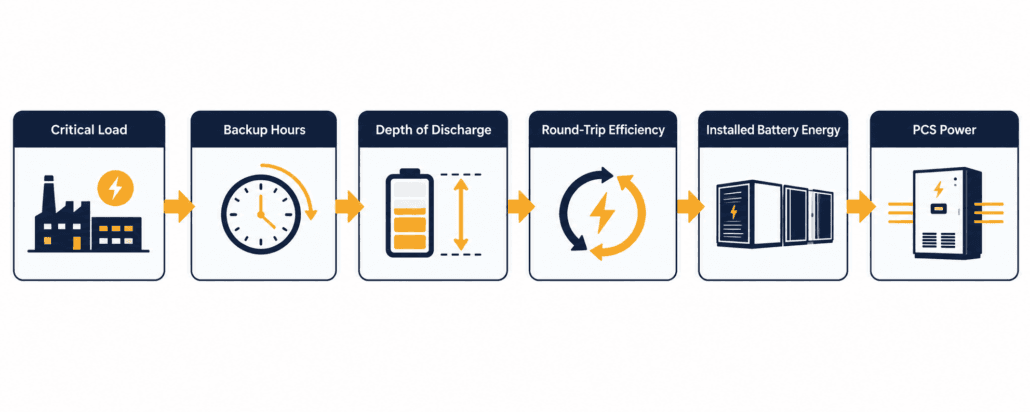
Every result from this C&I BESS sizing calculator comes from one of the formulas below. Here is what each one does, and why it matters.
Delivered Backup Energy
Delivered backup energy is critical load multiplied by backup hours. A 300 kW critical load for four hours, for example, needs 1,200 kWh delivered.
In short, this is the energy your equipment actually uses. It is not yet the battery size, since no battery discharges every stored kWh.
A facility with several critical circuits should sum them before running this figure.
Installed Battery Energy
Installed battery energy has three steps. First, divide delivered energy by depth of discharge. Then divide again by round-trip efficiency. Finally, add a reserve margin.
Together, DoD and RTE shrink how much nameplate capacity you can actually use. The reserve margin, meanwhile, covers degradation, temperature, and load uncertainty.
Most C&I LFP batteries run 85 to 95 percent depth of discharge. Round-trip efficiency usually sits between 90 and 95 percent at the system level. Always confirm this with your manufacturer’s datasheet.
Round-trip efficiency is a simplified, conservative assumption for a preliminary calculator. Final backup sizing should instead use discharge-path efficiency. That includes PCS, transformer, cable, battery, and auxiliary-load losses at the actual operating condition.
A wider site temperature range usually pushes real-world RTE toward the lower end of that band.
Recommended PCS Power and Apparent Power
Similarly, recommended PCS power is critical load times one plus a power margin. A 10 percent margin is a preliminary allowance only, and motor starting or other transient loads still need separate review.
Minimum apparent power in kVA, meanwhile, divides that PCS power by your system power factor. This is the screening figure for PCS and transformer ratings.
A lower power factor raises the apparent-power requirement, which can affect transformer selection.
C-Rate and Nominal E/P Duration
Finally, required C-rate is PCS power divided by installed battery energy. It shows how hard you are asking the battery to discharge.
Nominal E/P duration, by contrast, is installed battery energy divided by PCS power. Watch this figure closely. It often differs from your target backup hours, since DoD, RTE, and reserve margin all pull it away from a clean match.
A lower target C-rate generally means a larger, more conservative battery for the same PCS power.
| Calculation | Formula | Meaning |
| Delivered backup energy (kWh) | Critical load (kW) × backup duration (hours) | Energy the critical load needs during the outage. |
| Installed battery energy (kWh) | (Delivered ÷ (DoD × RTE)) × (1 + reserve margin) | Nominal capacity required after DoD, system efficiency, and reserve margin. |
| Usable battery capacity (kWh) | Installed battery energy × DoD | Energy within the chosen discharge window. |
| Recommended PCS power (kW) | Critical load × (1 + power margin) | Suggested continuous PCS output rating. |
| Minimum apparent power (kVA) | Recommended PCS power ÷ power factor | Screening value for PCS and transformer rating. |
| Required C-rate | Recommended PCS power ÷ installed battery energy | Power-to-energy relationship indicator. |
| Nominal E/P duration (hours) | Installed battery energy ÷ recommended PCS power | Configuration indicator, not a runtime guarantee. |
A C&I BESS Sizing Calculator Worked Example: 300 kW Critical Load
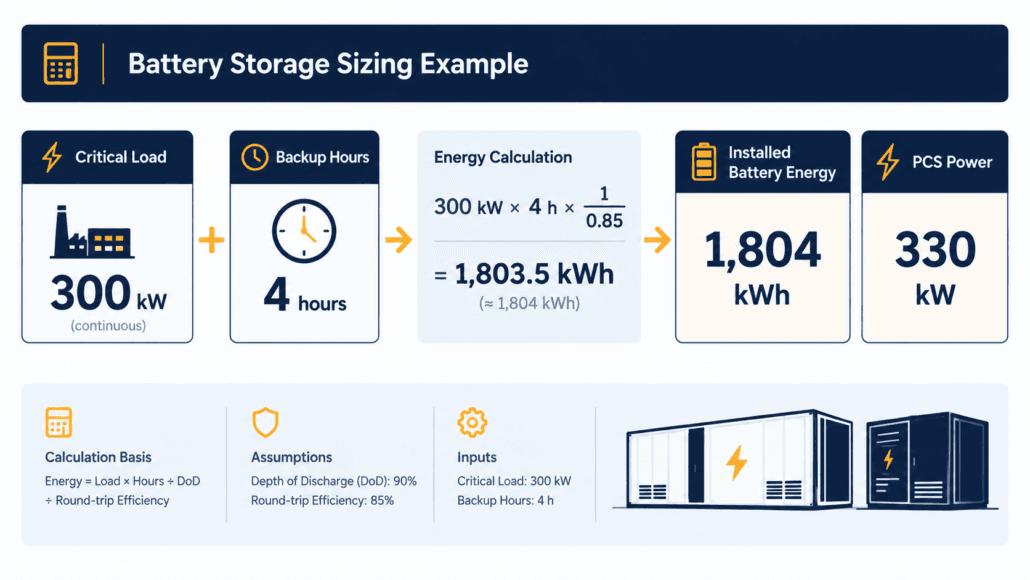
This worked example uses an 800 kW peak load and a 300 kW critical load. Backup duration is four hours.
Assumptions: 85% depth of discharge, 90% round-trip efficiency, 15% reserve margin. Also: 10% power margin, 0.90 power factor.
- Delivered backup energy: 300 kW × 4 hours = 1,200 kWh.
- Installed battery energy: (1,200 ÷ (0.85 × 0.90)) × 1.15 = 1,804 kWh, roughly 1.80 MWh.
- Usable battery capacity: 1,804 × 0.85 = 1,533 kWh.
- Recommended PCS power: 300 × 1.10 = 330 kW, or 0.33 MW.
- Minimum apparent power: 330 ÷ 0.90 = 367 kVA, or 0.37 MVA.
- Required C-rate: 330 ÷ 1,804 = 0.18C.
- Nominal E/P duration: 1,804 ÷ 330 = 5.5 hours. That’s longer than the 4-hour target. DoD, RTE, and reserve margin together explain the gap.
- This C&I BESS sizing calculator worked example uses one input combination. Change the backup duration to 2 hours, and installed battery energy roughly halves.
- Push reserve margin to 20 percent instead, and it grows a little further. Run a few combinations of your own before settling on a target range.
Common C&I BESS Sizing Calculator Mistakes
These mistakes show up again and again in early estimates. But each one is easy to avoid once you know to check for it, and most take only a few extra minutes to correct before you share a number with anyone.
- Ignoring DoD and RTE. In practice, sizing straight off delivered energy leaves a battery that cannot actually deliver the promised backup.
- Skipping the reserve margin. Batteries lose usable capacity over time. A 10 to 15 percent margin, therefore, buys headroom for later years, not just day one.
- Confusing power and energy. In short, a 330 kW PCS and a 1,804 kWh battery answer two different questions. Size both instead of just one.
- Ignoring the required C-rate. For instance, a high C-rate can raise thermal stress and cut usable capacity under load. It can also affect cycle life and fall outside warranty limits. Confirm your chosen battery and PCS support the required rate.
- Skipping fire code and siting review. NFPA 855, local fire and building codes, the authority having jurisdiction, and UL 9540A test evidence can all affect separation distances and layout. A preliminary estimate still needs a compliant site review. See our NFPA 855 guide for more detail.
- Using nameplate load instead of running load. Nameplate and measured running load serve different purposes. Size the C&I BESS sizing calculator energy inputs off measured running kW, but review starting and transient loads separately for PCS sizing.
- Skipping a sensitivity check. Run the calculator twice: once with conservative assumptions, once with optimistic ones. The gap between the two shows how much margin your estimate really has.
When You Need More Than a C&I BESS Sizing Calculator
Peak shaving, tariff optimisation, solar shifting, and generator integration all need more than one critical-load input. So do data centres and microgrids.
Peak shaving needs interval load data and your target demand level. Our demand charge guide covers why that line item is often 30 to 70 percent of a commercial bill.
Treat this calculator’s output as a starting point instead. Overall, bring it to an engineer, not to a procurement order.
Solar-plus-storage sizing is another case this C&I BESS sizing calculator does not cover. A hybrid system needs production profiles, self-consumption targets, and export limits alongside backup requirements.
Multi-building campuses work differently too. Size each building’s critical load separately, then combine the installed-energy totals rather than averaging duration targets across buildings.
Frequently Asked Questions
Quick answers to the most common C&I BESS sizing calculator questions, covering inputs, assumptions, and accuracy.
What inputs does a C&I BESS sizing calculator need?
At minimum: peak site load, critical load, and backup duration. Depth of discharge, round-trip efficiency, reserve margin, power margin, and power factor refine the estimate further.
What depth of discharge and round-trip efficiency should I use for LFP?
Most C&I LFP systems run 85 to 95 percent usable depth of discharge. Round-trip efficiency is usually 90 to 95 percent at the system level. Still, confirm exact figures with your manufacturer’s datasheet.
How much reserve margin should I add?
10 to 15 percent is a common starting point. It covers degradation, temperature swings, and load uncertainty. Still, longer contracts or harsher climates justify a larger margin.
Is a C&I BESS sizing calculator accurate enough for procurement?
No. Treat it as a preliminary estimate instead. Final sizing needs interval-load analysis, electrical design, site conditions, grid requirements, and product-specific warranty terms.
What’s the difference between installed and usable battery capacity?
Specifically, installed capacity is the nominal or nameplate energy capacity selected for the system. It is sized above the delivered-load requirement to account for DoD, system efficiency, and reserve margin. Usable capacity, by contrast, is the portion available within the selected DoD window.
Can this calculator size a multi-building campus?
Not directly in one pass. Run it once per building using each building’s own critical load and backup duration, then combine the installed-energy results before selecting a shared BESS.
How often should I re-run the calculator during a project?
Re-run it whenever a key input changes, such as an updated critical-load list, a revised backup target, or new DoD and RTE figures from a vendor quote. Treat early results as a starting range, not a fixed number.
Does this calculator account for battery degradation over time?
The calculator does not explicitly model year-by-year degradation. Its reserve margin is a user-selected allowance, not a validated end-of-life guarantee. Actual fade depends on chemistry, duty cycle, temperature, and your warranty terms.
Further Reading
More Sunlith guides pair well with this C&I BESS sizing calculator, covering fire code compliance, demand charges, and cost planning for C&I storage projects generally.
- NFPA 855 Guide
- C&I BESS Peak Shaving and Demand Charges
- What Is a Demand Charge and Why Is It So Expensive
- BESS CAPEX Calculation
- BESS Short Circuit Protection
Disclaimer: This calculator and article provide preliminary estimates only. Final BESS sizing requires interval-load analysis, electrical engineering design, site assessment, applicable grid and fire codes, and manufacturer-specific validation.
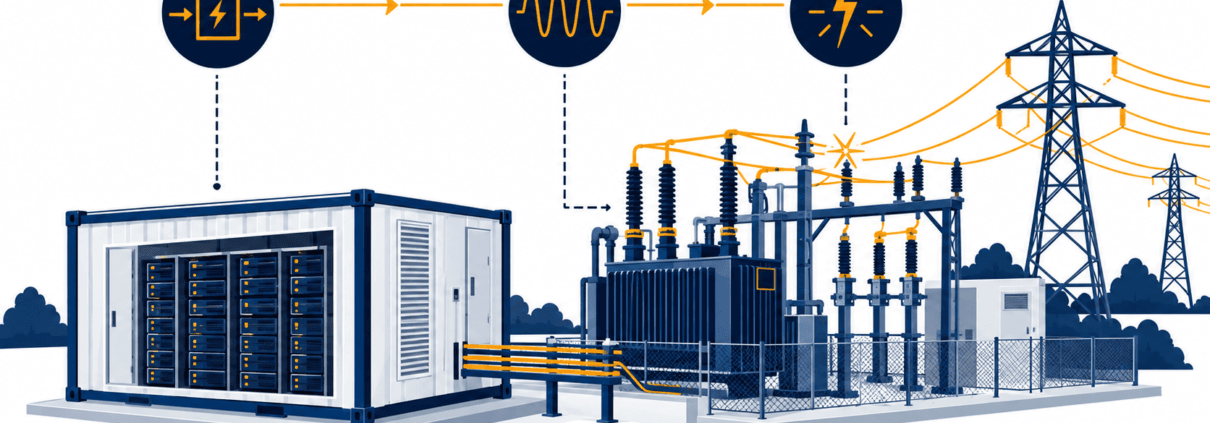
BESS Grid Connection Studies: Load Flow, Short-Circuit, Harmonics, RMS and EMT Modelling
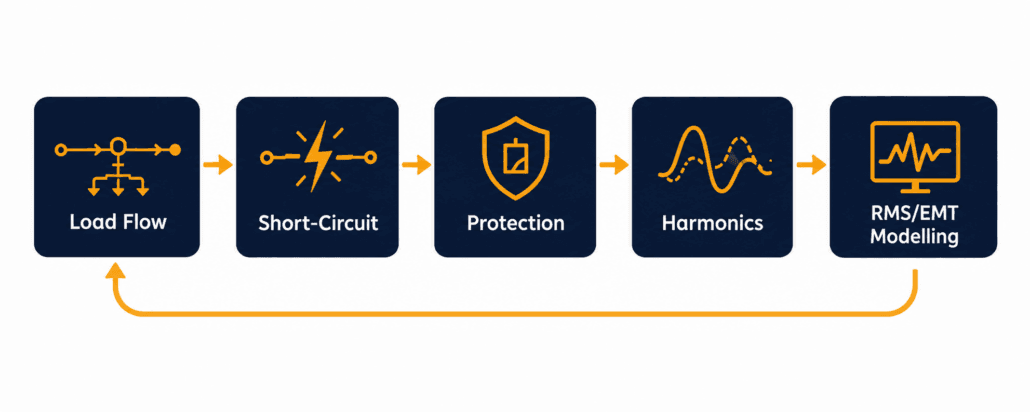
BESS grid connection studies are the engineering checks a network operator runs before it approves a battery storage project. Each study asks the same underlying question: can this plant connect and operate without exceeding voltage, thermal, fault-level, protection, or power-quality limits at the connection point? This guide covers the core BESS grid connection studies: load flow, short-circuit, protection coordination, harmonics, and RMS/EMT dynamic modelling.
Last reviewed: September 2026. Study requirements vary by network operator, project design, grid strength, and applicable grid code.
This guide walks through:
- What each of the core study types actually checks
- Why RMS and EMT modelling are different tools, not two names for the same thing
- Where these studies sit inside the wider interconnection timeline
- What a BESS developer needs to supply before a network operator can run them
- Common reasons a study package gets rejected or delayed
Quick Answer
BESS grid connection studies are the technical checks a network operator runs before interconnection: load flow, short-circuit, harmonics, and RMS/EMT dynamic modelling. Together, they confirm a battery project can connect safely, without degrading voltage, fault protection, or power quality on the connecting network.
BESS Grid Connection Studies Checklist
Before locking the BESS configuration or signing a PCS supply agreement, work through this checklist.
- Identify the likely point of connection, voltage level, and export/import capacity
- Obtain the network operator’s formal study scope, model format, and submission timeline
- Confirm whether the plant must operate grid-following, grid-forming, or both
- Obtain validated RMS models, and EMT models where required, for the PCS and plant controller
- Confirm the model’s operating range, control modes, fault-response logic, and firmware version
- Screen local grid strength, nearby inverter-based resources, and background harmonic levels early
- Reserve schedule time for model review, study reruns, and compliance testing
- Carry a contingency for mitigation measures such as filtering, a revised export limit, or grid-forming controls
What Are BESS Grid Connection Studies?
BESS grid connection studies answer one question. Can this project connect here safely? The network operator studies the plant at its point of interconnection (POI), sometimes called the point of common coupling (PCC). It then compares the results against the planning limits already set for that part of the grid.
Specifically, study scope depends on three main factors: project size, connection voltage, and how electrically “stiff” or “weak” the network already is. For instance, a small distribution-connected project may only need a load flow and a short-circuit study. A large transmission-connected BESS at a weak point of connection may require a broader package, including load flow, short-circuit, protection, harmonic, RMS dynamic, and potentially EMT studies. Our guide to the BESS interconnection process covers where this study stage sits inside the wider application-to-commissioning workflow.
Why BESS Grid Connection Studies Don’t Follow One Fixed Order
Network operators often organise BESS grid connection studies in phases, but not always in a strict, one-way order. Early load flow and short-circuit work usually establishes basic connection feasibility first. Protection, harmonics, RMS, and EMT studies can run in parallel, or get repeated, as the selected PCS, transformer, plant controller, and operating limits become clearer. Treat the study package as an iterative engineering process, not a single pass through a checklist.
Load Flow: The First of the BESS Grid Connection Studies
A load flow study is also called a power flow study. It models the network in its normal, steady-state condition, with the new BESS connected. The question is simple. Will voltages and equipment loading stay inside acceptable limits once this plant is added?
In addition, the study represents the BESS plant in full detail rather than as one generic source. A proper power flow model includes the generator tie line, the main step-up transformer, the collector system, and the plant’s reactive power range at every output level, from full charge to full discharge. A BESS is a four-quadrant device, so the study checks both directions of power flow. Therefore, it does not simply evaluate export power.
What a Load Flow Study Looks For
- Thermal loading on lines, cables, and transformers under peak import and export
- Voltage rise and voltage drop across the connection, under different dispatch scenarios
- Whether existing voltage-regulation equipment, like tap changers, still works correctly
- Reverse power flow conditions that did not exist before the BESS connected
- The reactive power range the plant must hold to keep voltage inside its schedule
In practice, a voltage or thermal violation usually leads to revised operating limits, network reinforcement, or design changes that get assessed in a further study iteration, rather than an outright rejection. This is a normal, expected part of BESS grid connection studies, not a sign the project has failed.
Short-Circuit Studies for BESS Grid Connection
A short-circuit study is also called a fault-level study. It calculates how much current would flow during a fault, at different points on the network, both with and without the BESS connected. The network operator uses this to confirm existing switchgear, relays, and conductors can still safely handle a fault once the new plant joins the system.
BESS fault behaviour differs from a conventional generator’s fault behaviour in a real way. A synchronous machine’s fault current is limited mainly by its own impedance, and it can spike to several times rated current for a brief period. A BESS PCS instead limits fault current through its own control and protection logic. As a result, the magnitude, sequence components, duration, and active-versus-reactive current priority can all vary by inverter design, grid code, control mode, fault type, and voltage conditions. This distinction matters for protection coordination. Protection designed around conventional-generator assumptions may lose sensitivity, selectivity, or coordination once the connected resource has inverter-limited fault-current behaviour.
Maximum and Minimum Fault Levels in BESS Grid Connection Studies
A thorough short-circuit study calculates two separate cases, not one. The maximum fault level, using the highest credible fault current, confirms equipment ratings are not exceeded. The minimum fault level, using the lowest credible fault current, confirms protection relays still see enough current to clear a fault reliably. One international standard covers the underlying AC-side calculation method in detail: IEC 60909, developed for AC short-circuit currents generally and increasingly applied to BESS/PCS fault contribution. A separate standard, IEC 61660, covers fault calculations in station DC and auxiliary DC systems. That’s relevant to a BESS’s own DC-side protection design, but it is separate from the AC grid-fault analysis that normally forms part of a network operator’s interconnection study. The same IEC technical committee developed both.
Protection Coordination in BESS Grid Connection Studies
Protection coordination is often scoped as its own study, separate from the short-circuit calculation itself. The short-circuit study sets the fault-current numbers. Meanwhile, the protection study decides what the relays actually do with those numbers.
The network operator checks that protection isolates a fault selectively, tripping the minimum necessary equipment while maintaining coordinated backup protection where required. Protection must also stay secure during external events, riding through rather than clearing. This gets more involved with a BESS on the feeder. Its current contribution is shaped by inverter control logic, not fixed machine impedance.
What a Protection Study Checks
- Relay grading and trip-curve settings across the feeder, with the BESS included
- Whether protection stays selective, so only the closest device clears an internal fault
- Anti-islanding detection and response
- Current-transformer and voltage-transformer sizing against the new fault-current profile
- Coordination margins between the BESS’s own protection and the network operator’s relays
A February 2026 National Energy System Operator (NESO) guidance document on RMS and EMT model requirements identifies overvoltage and undervoltage protection, over- and under-frequency protection, and DC bus voltage and current protection as functions that should be represented where relevant to the inverter-based resource, modelled for both balanced and unbalanced fault conditions. That level of protection detail needs to reach the study, not just sit in the PCS vendor’s own product documentation.
Harmonics: The Power-Quality Piece of BESS Grid Connection Studies
A harmonics study checks waveform quality at the connection point, not just its magnitude. A battery inverter switches at high frequency to convert DC to AC. That switching process injects some waveform distortion back into the grid, alongside its intended fundamental-frequency output.
Two related metrics matter here. Voltage THD (total harmonic distortion) expresses the RMS value of harmonic voltage components relative to the fundamental voltage. Current TDD (total demand distortion) expresses RMS harmonic current relative to the maximum demand load current, rather than the instantaneous fundamental current, which keeps the limit meaningful at light-load conditions too. Both voltage and current distortion can technically be expressed as THD, but in the US, IEEE 519 commonly uses TDD specifically for evaluating current distortion at the point of common coupling. Network operators may also assess individual harmonic components, interharmonics, resonance, and planning levels beyond these two headline figures. Internationally, IEC/TR 61000-3-6 gives a comparable framework for assessing harmonic emission limits when connecting a distorting installation, inverter-based generation included, to medium, high, and extra-high voltage systems.
Why Inverter-Based Resources Change the Harmonics Picture
A single small inverter rarely causes a measurable problem on its own. However, a utility-scale BESS plant is different. So is a feeder where BESS and solar PV share the same connection point. Harmonic currents from multiple sources can add together at certain frequencies, rather than simply cancel out. The available fault current at the connection point also affects how much voltage distortion a given harmonic current actually produces, which is why harmonics work is closely tied to the short-circuit study rather than assessed in isolation. A weaker fault level turns the same harmonic current into a larger voltage distortion.
RMS and EMT Dynamic Modelling for BESS Grid Connection Studies
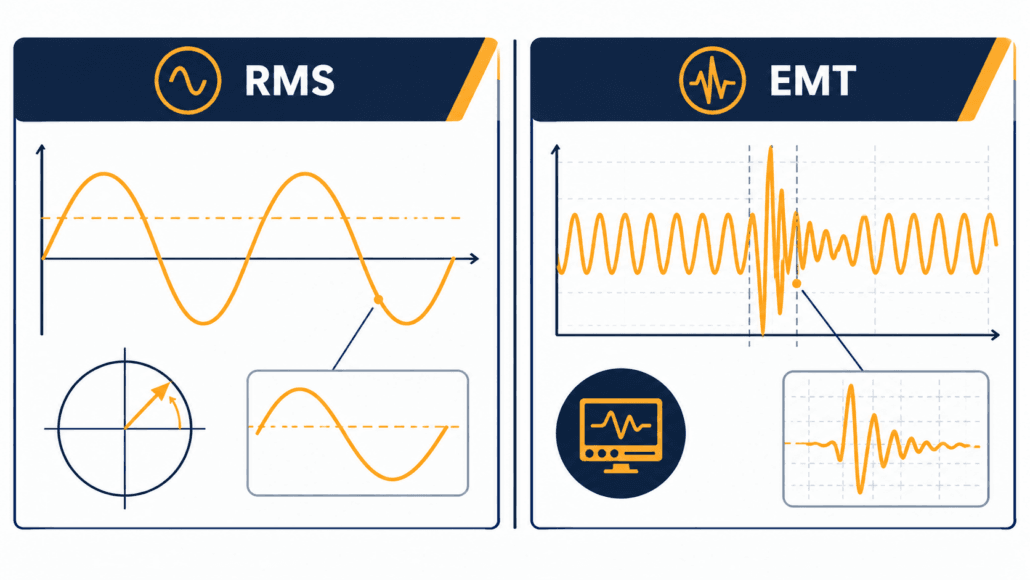
RMS and EMT are the two simulation domains used to study how a BESS plant behaves during a disturbance, not just at steady state. They answer different questions, at different levels of detail. A network operator usually specifies which one it needs based on how electrically weak the connection point already is.
First, RMS modelling stands for root-mean-square, or phasor-domain, simulation. It represents the network using simplified fundamental-frequency phasors. It tracks how power, voltage, and frequency evolve over seconds to minutes. So RMS is efficient enough to study a large interconnected network. It is the standard tool for frequency response, voltage stability, and wide-area planning work.
Conversely, EMT modelling stands for electromagnetic transient simulation. It represents the actual instantaneous waveform, not a simplified phasor. It captures behaviour on the scale of microseconds to milliseconds. Even so, EMT is far more demanding to compute, which limits it to a smaller network area. It is generally the preferred domain for capturing fast inverter control-loop interactions, detailed unbalanced-fault behaviour, switching transients, and other sub-cycle dynamics that a simplified RMS model may not capture adequately.
When EMT Modelling Becomes Necessary
A 2023 NERC reliability guideline on BESS and hybrid plant modelling identifies low short-circuit strength, interaction risk among multiple inverter-based resources, and grid-forming control as important situations where detailed EMT assessment may be appropriate. The final requirement stays project- and network-operator-specific. Still, RMS models stay adequate for most standard planning and screening work. Even so, network operators increasingly ask for both. RMS handles the broad system-wide screening. EMT handles the specific, electrically sensitive area near the new plant.
For the country-specific grid-code obligations these studies are designed to demonstrate, see our BESS Grid Codes and Compliance guide.
RMS vs EMT at a Glance
| Factor | RMS (Phasor-Domain) | EMT (Electromagnetic Transient) |
| Time scale | Seconds to minutes | Microseconds to milliseconds |
| Represents | Simplified fundamental-frequency phasor | Actual instantaneous waveform |
| Typical use | Frequency response, voltage stability, wide-area planning | Weak-grid behaviour, control interactions, protection response |
| Network size | Large, interconnected systems | Smaller, localized network area |
| Computational cost | Lower | Considerably higher |
| Model source | Vendor-supplied standardised dynamic model | Vendor-supplied detailed EMT model |
System Strength and Weak-Grid Considerations
System strength describes how firmly the local network holds its voltage and frequency steady when a disturbance hits. A weak point of connection has relatively high impedance. That makes it more sensitive to fast inverter-control action, not less.
Indeed, a BESS can genuinely help a weak grid, especially with a well-designed voltage-control or grid-forming PCS. But connecting at a weak point still raises real risks. The study package needs to catch control-loop instability in grid-following inverters, conflicts between current limits and voltage support, harmonic amplification, and slower fault ride-through than a stronger point would show.
Grid-Forming Controls Don’t Automatically Fix a Weak Grid
Grid-forming capability has to be assessed against three things: the specific operating mode the network operator requires, the protection design, and how the plant interacts with other inverter-based resources nearby. It is one mitigation option among several, not an automatic pass. Our Australia BESS grid connection guide covers how one network operator assesses system strength and grid-forming capability in practice, including where AEMO’s own guidance applies.
How BESS Grid Connection Studies Fit Into the Interconnection Timeline
These study types do not run on their own. They sit inside one defined stage of the wider interconnection process. That stage generally follows the initial application and feasibility screening, but comes before a formal connection agreement. Our BESS interconnection process guide covers this full sequence step by step. The country guides for Australia, the UK, and Europe each show how local network operators schedule this stage in practice.
What a Developer Must Supply for BESS Grid Connection Studies
The network operator cannot run a meaningful study without accurate models from the project side. A model that does not match the as-built equipment is one of the most common reasons a study result later fails to match real commissioning-test behaviour. A typical model-deliverable package includes:
- PCS RMS model in the network operator’s required format
- EMT model, where requested or reasonably anticipated
- Plant-controller model and parameter file
- Inverter control-mode descriptions and operating limits
- Transformer vector group, impedance, tap range, and grounding data
- Cable and collector-system parameters
- Protection single-line diagram and proposed relay settings
- Reactive-power capability curve
- Harmonic emission spectrum or equivalent frequency-domain data
- Firmware, model, and controller version numbers
- Model validation report and revision history
Common Pitfalls in BESS Grid Connection Studies
Most delays in a BESS grid-study package trace back to a small set of recurring issues. In fact, few come from a genuinely hard technical problem.
Common Study Failures and How to Avoid Them
| Failure | Why It Happens | How to Prevent It |
| Studies start with only generic inverter data | The selected PCS or control configuration isn’t final yet | Use generic data for early screening only; replace it with validated project-specific models before final submission |
| Charging mode gets treated as secondary | Teams model export in detail but skim over maximum import and reactive-only cases | Include charging, discharging, standby, and reactive-only cases from the start |
| Co-located equipment gets left out | Nearby solar, capacitor banks, and cables all shift the dynamic and harmonic picture | Model the full plant and any electrically relevant equipment nearby |
| A model is submitted unvalidated | The network operator can’t reproduce the plant’s expected behaviour | Require validation evidence and parameter traceability from the PCS supplier |
| Late firmware changes go unreported | The installed controls no longer match the approved model | Use formal change control, and resubmit for study when material settings change |
How Study Results Affect BESS Cost and Revenue
Grid connection studies aren’t just a technical hurdle; instead, their results feed straight into the project’s business case. A study can change several things at once. The substation and protection scope. The PCS rating actually needed. Whether harmonic filtering or extra reactive-power equipment gets added. The final export or import capacity the plant is allowed.
A project designed around a 100 MW PCS might come out of studies with only 80 MW of firm export capacity. Or it might carry a reactive-power reservation that reduces available active power at certain voltage conditions. Each of those changes affects CAPEX, usable revenue capacity, and lifetime project economics. So study results should inform the financial model before procurement is finalised, not after.
For the cost and revenue side of that picture, see Sunlith’s guides to BESS CAPEX calculation, BESS OPEX and operating cost modelling, and BESS revenue streams and value stacking.
Comparing the Core BESS Grid Connection Studies
| Study | Domain | Core Question | Typical Trigger |
| Load flow | Steady state | Do voltage and thermal limits hold with the plant connected? | Most grid-connected projects |
| Short-circuit | Fault condition | Does fault current stay within equipment and protection limits? | Common for projects requiring detailed technical review |
| Protection coordination | Fault response | Does protection stay selective and secure with the BESS added? | Where protection settings, fault duty, or anti-islanding could be affected |
| Harmonics | Waveform quality | Does distortion stay within planning levels at the connection point? | Common for inverter-based systems, where required by the operator or power-quality standard |
| RMS/EMT dynamic | Transient/dynamic | Does the plant stay stable through disturbances and control interactions? | More likely for large, weak-grid, grid-forming, or transmission-connected projects |
Frequently Asked Questions
Common questions readers ask about BESS grid connection studies, answered directly.
Does every BESS project need all of these grid connection studies?
Not always. Smaller distribution-connected projects on a strong network often only need load flow, short-circuit, and protection coordination studies. Harmonics and dynamic RMS/EMT studies become more likely as project size grows, as the connection point gets weaker, or as the project uses grid-forming controls. Confirm the required scope with the relevant network operator.
Who actually performs BESS grid connection studies?
The network operator, or transmission owner, typically runs the studies. It uses models the developer’s equipment vendors and system integrator supply. Some markets let a developer commission an independent, accredited study provider for part of the work, subject to the operator’s review.
What’s the real difference between RMS and EMT modelling?
RMS modelling represents slower power-system dynamics using simplified phasors. In contrast, EMT modelling represents the actual instantaneous waveform, capturing much faster behaviour down to microseconds. EMT suits weak-grid and control-interaction studies that RMS cannot see in enough detail.
Why does a BESS need its own short-circuit study, instead of using generic generator data?
A battery inverter’s fault current is limited by its control system, not by machine impedance, so it behaves differently from a synchronous generator during a fault. Reusing generic synchronous-generator assumptions for a BESS can misrepresent both the maximum and minimum fault-current cases that protection settings depend on.
How long does a full grid connection study package take?
Timelines vary by market, network operator workload, and study complexity. They can range from a few weeks for a simple load flow and short-circuit package, to many months where full RMS and EMT modelling is required. Treat any timeline as a planning estimate, and confirm current queue times with the relevant network operator.
What happens if a project fails a grid connection study?
A failed result rarely ends the project outright. So the network operator usually proposes a fix instead, such as a lower export limit, added reactive power support, network reinforcement, or a different control-mode requirement. The project is then re-studied against the revised assumptions. Rejection outright is uncommon in real BESS grid connection studies.
Do harmonics studies apply differently to a BESS than to solar PV?
The underlying inverter switching behaviour is similar. But a BESS charges and discharges across a four-quadrant range, so its harmonic contribution needs checking across a wider set of operating points than a generation-only solar PV plant, which only ever exports.
Does a grid-forming BESS need a different study approach?
Often, yes. Grid-forming BESS projects are more likely to require detailed EMT assessment, because control-loop, current-limit, and fault-response behaviour can matter a great deal in weak-grid conditions. RMS modelling may still cover the broader system studies, but the network operator may separately require EMT evidence for the local interaction assessment.
Can a firmware update trigger a new grid connection study?
Yes. If a firmware change alters protection behaviour, current limits, grid-forming logic, fault ride-through, or reactive-power control, the network operator may require a fresh assessment or an updated model. Treat firmware updates on commissioned equipment as controlled engineering changes, not routine maintenance.
Glossary
More Sunlith Energy definitions for terms used throughout this BESS grid connection studies guide.
Study and Network Terms
Load flow (power flow) study — A steady-state check of voltage and equipment loading across the network, with a new plant connected.
Short-circuit (fault-level) study — A check of fault current magnitude at points across the network, used to confirm equipment and protection ratings.
POI (point of interconnection) — The physical point where a generating plant connects to the wider network.
PCC (point of common coupling) — The point on the network, often the same as the POI, where harmonic and power-quality limits get assessed.
System strength — How firmly a local network holds voltage and frequency steady when a disturbance occurs; a low-strength, or “weak,” connection point is more sensitive to fast inverter-control action.
Modelling and Power-Quality Terms
RMS modelling — Phasor-domain simulation used to study slower power-system dynamics, over seconds to minutes.
EMT modelling — Electromagnetic transient simulation used to study fast, instantaneous waveform behaviour.
THD (total harmonic distortion) — The RMS value of harmonic voltage (or current) components relative to the fundamental. Commonly used for voltage distortion at the connection point.
TDD (total demand distortion) — RMS harmonic current relative to the maximum demand load current, not the instantaneous fundamental current. IEEE 519 commonly uses this for current distortion.
Disclaimer
Important: This guide is general technical information, not project-specific engineering advice. Study requirements, thresholds, and timelines vary by network operator, connection voltage, project size, and jurisdiction. Confirm the required study scope and current standards with the relevant network operator, and a qualified electrical or grid-connection engineer, before relying on any figure here for a real project.
Further Reading
More Sunlith Energy guides on BESS interconnection, grid codes, and short-circuit standards.
- Follow the full BESS interconnection process (BESS Interconnection Process: From Application to Commercial Operation)
- Review BESS grid-code requirements by country (BESS Grid Codes and Compliance)
- Learn AC-side fault-current calculation under IEC 60909 (IEC 60909 Explained: AC Short-Circuit Currents for BESS)
- See DC auxiliary-system fault-current calculation under IEC 61660 (IEC 61660 Explained: Calculating DC Short-Circuit Currents)
- Explore the PCS hardware behind fault ride-through (Fault Ride-Through Features: PCS Hardware and Control Functions)
- Review LVRT and HVRT voltage ride-through requirements (LVRT and HVRT: Voltage Ride-Through Requirements)
- Compare Australia’s AEMO/TNSP/DNSP connection process (Australia BESS Grid Connection)
- Compare the UK’s NESO/DNO connection process (UK BESS Grid Connection)
- Compare the EU’s country-by-country connection process (Europe BESS Grid Connection)
- See the BESS CAPEX calculation methodology (BESS CAPEX Calculation)
- See the BESS OPEX and operating cost model (BESS OPEX and Operating Cost Model)
- See how BESS revenue streams stack (BESS Revenue Streams and Value Stacking)
Sources and Technical References
Primary and external sources cited in this article.
1. NERC, “Reliability Guideline: Performance, Modeling, and Simulations of BPS-Connected Battery Energy Storage Systems and Hybrid Power Plants,” June 2023.
2. IEEE Std 519-2022, “IEEE Recommended Practice and Requirements for Harmonic Control in Electric Power Systems.”
4. National Energy System Operator (NESO), “Frequently Asked Questions on Root Mean Square (RMS) and ElectroMagnetic Transient (EMT) Model Requirements,” February 2026.
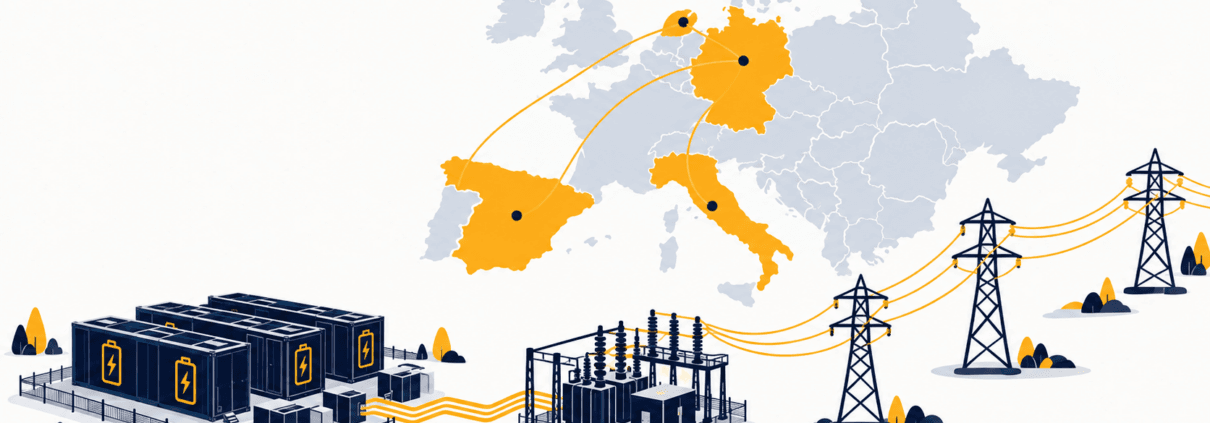
Europe BESS Grid Connection: EU RfG and Country Guide
A Europe BESS grid connection depends on the country where the project is located within the European Union, not just its size or voltage. The EU-wide Requirements for Generators (RfG) regulation provides a common technical baseline. But each country runs its own transmission system operator, its own national grid code, and its own connection process. So the practical route, and the risk of delay, can differ sharply between markets that share the same underlying EU rules.
Scope note: This guide covers the EU-wide RfG framework, then spotlights four of Europe’s largest BESS markets: Germany, Spain, Italy, and the Netherlands. The United Kingdom sits outside the EU and follows its own framework, covered in a separate guide. Norway and Switzerland connect into the same ENTSO-E system but sit outside the EU too, and are not covered in detail here.
Quick answer: A BESS grid connection in the EU starts with the Requirements for Generators (RfG) framework, but the real route is decided nationally. The relevant TSO or DSO applies its own country-specific grid code, connection process, capacity-allocation rules, studies, and compliance tests. Germany, Spain, Italy, and the Netherlands each face significant connection pressure right now, so confirm current queue, congestion, and permitting requirements with the relevant network operator before fixing a schedule or equipment specification.
So, this guide walks through:
- How the EU-wide RfG framework sets a common technical baseline across member states
- Who governs a Europe BESS grid connection at the EU level and the national level
- How the connection process generally works, stage by stage
- Country spotlights on Germany, Spain, Italy, and the Netherlands
- The common thread across these markets, and how to reduce connection risk
Europe BESS Grid Connection Checklist
- Confirm the country, connection voltage, network level, and applicable synchronous area, because RfG thresholds and national requirements vary.
- Identify the likely RfG Power Generating Module Type (A, B, C, or D) for the project’s capacity and voltage.
- Confirm whether the project connects to the national TSO or a regional DSO, and what that changes.
- Check the national grid code’s specific requirements, since these can go well beyond the EU baseline.
- Screen the country’s current connection-queue status, since several markets have overhauled their rules recently.
- Ask the PCS supplier and system integrator for validated models in the format the network operator requires.
- Allow schedule contingency for studies, national permitting, and grid-code compliance testing.
Who Governs a Europe BESS Grid Connection?
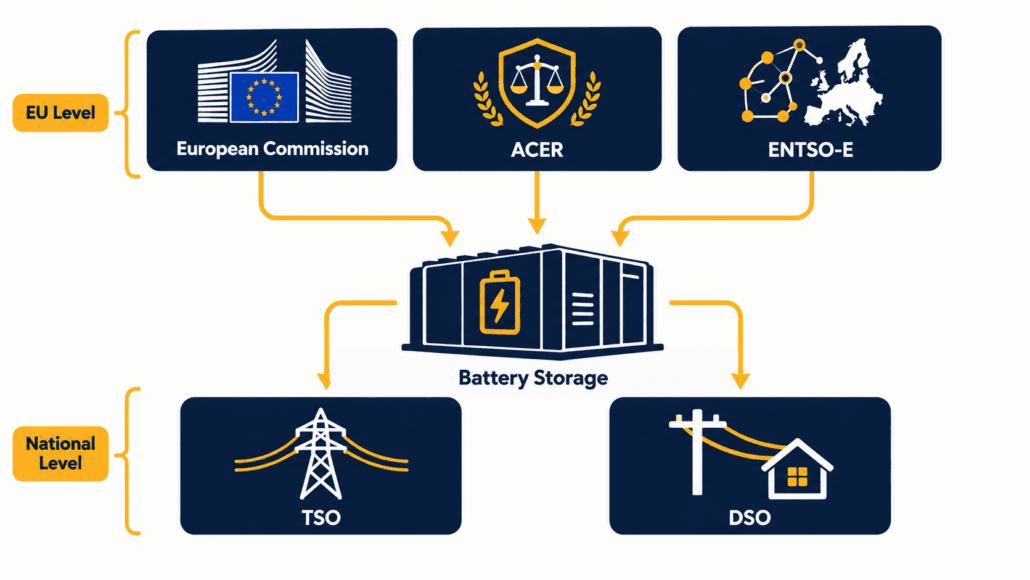
No single body runs a Europe BESS grid connection from end to end. Instead, EU-level bodies set the common framework, while national bodies run the actual connection process.
| Organisation | Main role for BESS projects |
| European Commission | Adopts EU network codes, including RfG, as binding regulations across member states. |
| ACER | The EU Agency for the Cooperation of Energy Regulators. Recommends network codes and coordinates national regulators. |
| ENTSO-E | The European Network of Transmission System Operators. Coordinates technical implementation of RfG and related codes across national TSOs. |
| National TSO | Operates the transmission grid and connects larger or transmission-voltage projects. The number and structure of TSOs vary by country; Germany, for example, has four. |
| National DSO(s) | Operate regional or local distribution networks and connect most smaller and medium-sized projects. Often several per country. |
| National regulator | Approves connection rules and technical codes at the national level. Examples include Germany’s Bundesnetzagentur, Spain’s CNMC, Italy’s ARERA, and the Netherlands’ ACM. |
So don’t assume ENTSO-E or the European Commission reviews individual projects. Instead, they set the common framework. In practice, the project deals mainly with the relevant TSO or DSO and, where applicable, the energy regulator.
Current detail from EU-level bodies: ENTSO-E’s RfG overview, ACER.
The EU-Wide Framework Behind a Europe BESS Grid Connection
RfG classifies Power-Generating Modules (PGMs) into Types A to D. For BESS projects in EU member states, this is the shared technical baseline behind most connection requirements.
| Type | General basis | What it means in practice |
| Type A | Smallest capacity, lowest voltage | Fewest technical requirements, often a simplified process |
| Type B | Small to medium capacity | More technical requirements than Type A, thresholds vary by country |
| Type C | Medium to large capacity | Detailed technical and testing requirements |
| Type D | Largest capacity, or connects at high voltage | Most extensive requirements, including full system studies |
The exact MW thresholds between types are not identical across the EU, though. RfG sets upper limits for each synchronous area, but leaves the precise threshold within that band to the national level. So a project sitting near a threshold in one country may fall into a different type in another. Confirm the applicable type with the connecting TSO or DSO rather than assuming a single EU-wide number.
Battery storage adds a further wrinkle, and this is worth reading carefully. RfG was drafted around generation, and storage can be treated differently depending on the national implementation, the BESS’s operating mode, and its connection arrangement. In many member states, storage that exports to the grid is assessed using requirements aligned with the relevant PGM category, but developers should confirm the exact national treatment with the connecting TSO or DSO rather than assume it works identically to a conventional generator. National implementation of RfG can also add significant detail beyond the EU baseline, as our global BESS grid codes comparison shows.
How the Europe BESS Grid Connection Process Works, Stage by Stage
Treat the connection journey as a set of stages, not one checklist. The framework stays similar across countries, but the pace and detail vary a great deal, as the country spotlights below show.
Stage 1: Site Screening and Capacity Assessment
First, confirm the country, the likely point of connection, and whether that point sits on the transmission or distribution network. Then estimate the project’s likely RfG type, since this shapes both the technical requirements and the study scope ahead. Also screen the national connection queue early. As the country spotlights below show, several major markets are running queues many times larger than their planning assumptions. So realistic timing matters more than nameplate capacity alone.
Stage 2: Connection Application
Next, submit a connection application to the relevant network operator. That means the relevant TSO for transmission-network connections or larger projects, or the relevant DSO for many distribution-network connections. The application should identify the proposed site, capacity, connection voltage, and intended operating modes. Requirements for what to include vary by country, so check the specific network operator’s current application format rather than assuming one EU-wide template.
Stage 3: Studies and Compliance Verification
The network operator then sets the study scope. Larger or higher-type projects generally need load-flow, short-circuit, and dynamic-performance studies against the applicable national grid code. Many countries also require compliance documentation, certificates, or witnessed test evidence before energisation, where the national framework calls for it, confirming the installed plant meets the agreed technical requirements.
Treat model submission as real engineering, not paperwork. Ask the PCS supplier and system integrator for validated models in the format the network operator requires, together with controller logic and operating-mode assumptions, before finalising procurement.
See our guide on fault ride-through and LVRT/HVRT capability for more on the dynamic-performance side of this testing.
Stage 4: Connection Offer and Permitting
Both the network operator’s response and the surrounding permitting process vary significantly by country. In some markets, access and connection authorisations are processed through linked or coordinated procedures. In others, they are separate stages with their own timelines. Environmental and planning permits often run in parallel, and can end up the longer critical path on a large project. Confirm the current sequence with the relevant network operator and permitting authority early.
Stage 5: Construction and Commissioning
Commissioning confirms the installed plant matches the approved design. Expect to provide as-built documentation and protection settings, plus any certification or compliance evidence required by the national framework and network operator before energisation. Testing typically covers protection behaviour and, for larger or higher-type projects, dynamic performance against the applicable grid code.
Stage 6: Ongoing Compliance
Compliance does not stop once operation begins. Instead, changes to inverter firmware, protection settings, plant-controller logic, or other declared technical parameters can trigger a reassessment. So treat compliance documentation as an ongoing operational task, not a one-off commissioning step.
Realistic timelines vary enormously by country and by where a project sits in that country’s connection queue, application pipeline, or capacity-allocation process. A small, distribution-connected project can sometimes progress in months. A large, transmission-connected project in a congested market can take years, and several major markets are actively reworking their queue rules as this guide is written. Build schedule contingency around studies and queue position specifically, since both are the hardest parts to forecast right now.
For the general, country-agnostic version of this workflow, see our BESS interconnection process guide.
Country Spotlight: Germany
Germany runs four regional TSOs: 50Hertz, Amprion, TenneT Germany, and TransnetBW. Their number and structure are specific to Germany, not a Europe-wide pattern. Distribution-level projects instead connect through one of many regional DSOs. The national regulator is the Bundesnetzagentur.
Technical requirements come from the VDE-AR-N series: 4105 for low voltage, 4110 for medium voltage, and 4120 for high voltage, each implementing RfG in German-specific detail. Battery projects also typically need to meet VDE-AR-E 2510-50 for battery safety, alongside the relevant grid-connection code.
The connection process itself is changing. By the end of Q3 2025, Germany’s four TSOs had received 545 applications for large battery-storage systems representing 211 GW of requested capacity. That figure describes application volume, not contracted or construction-ready capacity, and it compares to a Grid Development Plan forecast of just 41 to 94 GW of large-scale storage by 2037.
In response, the TSOs jointly proposed a new maturity assessment procedure, the Reifegradverfahren, to move away from allocation based solely on application date, toward an evaluation based on land control, permitting status, technical readiness, and financial or commercial readiness. The procedure began its application phase on 1 April 2026. As of that announcement, the TSOs themselves noted that confirmation of the procedure’s legal basis by the Bundesnetzagentur was still advisable. So treat this as a live, TSO-led process still being formalised, rather than a settled legal framework, and confirm current requirements directly with the relevant TSO.
See: the four German TSOs’ joint press release on the maturity assessment procedure.
Country Spotlight: Spain
Spain has one national TSO, Red Eléctrica de España (REE), plus regional DSOs for distribution-level connections. Meanwhile, the national regulator is the Comisión Nacional de los Mercados y la Competencia (CNMC).
Since 2020, Spain has processed access and connection permits together. Developers submit a single joint application to REE or the relevant DSO, rather than two separate steps. During 2025, Spain’s storage-access framework underwent several changes. Royal Decree-Law 7/2025 included proposed measures relevant to storage access, but Congress rejected it on 22 July 2025, so it never took permanent legal effect. Related provisions were later introduced through Royal Decree 997/2025, approved on 5 November 2025, which also addressed how installed capacity is calculated for hybrid and standalone storage projects. Given this history, confirm the currently applicable rule directly with REE or CNMC rather than citing either decree from memory.
The scale of pent-up demand is striking. Published Spanish grid data has indicated a large pipeline of storage projects at different access, connection, and pre-commissioning stages, while commissioned battery capacity remains much lower, on the order of a few hundred MW. Check REE’s latest dataset before using any specific pipeline figure in a schedule or investment decision.
See: Royal Decree 997/2025 (BOE-A-2025-22434).
Country Spotlight: Italy
In Italy, Terna manages transmission-network connections, while regional distribution operators manage most distribution-network connections. In some circumstances, projects of 10 MW or more may be handled by Terna, but the responsible operator depends on the point of connection, voltage level, network configuration, and the applicable TICA provisions. ARERA, the national energy regulator, sets the technical and economic conditions for both, through the Testo Integrato delle Connessioni Attive (TICA). Confirm the route with the prospective network operator rather than relying on capacity alone.
Like Germany and the Netherlands, Italy is managing far more connection requests than its network was planned for. As of 31 May 2026, Terna’s Econnextion platform recorded roughly 294 GW of storage connection requests alone, well beyond national 2030 targets. In response, Decreto MASE 291/2026, signed 8 September 2026 and in force from 9 September 2026, requires Terna to divide the national transmission grid into microzone (microzones) and calculate available capacity for renewables and storage within each. The decree sets out a phased rollout: Terna must submit its microzone methodology to the ministry within 30 days of the decree taking effect, with the finalised microzones published within a further 15 days after approval. So treat the underlying capacity-allocation reform as legally in force, but the actual microzone boundaries and published capacity figures as still being rolled out through late 2026.
See: Decreto MASE 291/2026 (Italy’s Ministry of Environment and Energy Security).
Country Spotlight: Netherlands
The Netherlands has one national TSO, TenneT, plus regional DSOs for distribution-level connections. The Authority for Consumers and Markets (ACM) is the national regulator.
Grid congestion, known locally as netcongestie, is the defining issue for new connections in much of the country. TenneT’s own reporting has described a connection queue including tens of gigawatts of battery storage requests against a national peak load a fraction of that size.
In response, ACM authorised flexible capacity arrangements, including what TenneT calls the time-bound transmission right (TDTR) and the capacity control contract (CSC), under which a project may accept reduced or conditional access in exchange for network capacity or congestion-management value. A battery that can act as a controllable congestion mitigator, reducing strain on the grid at TenneT’s request under this framework, may receive preferential treatment under the applicable congestion-management or capacity-allocation framework. Confirm the exact contract type, availability, and eligibility conditions directly with TenneT or the relevant DSO, since this framework is still being extended to new regions and projects.
See: TenneT’s own account of its first congestion-mitigator contract.
Comparing Europe BESS Grid Connection Markets: Germany, Spain, Italy, and the Netherlands
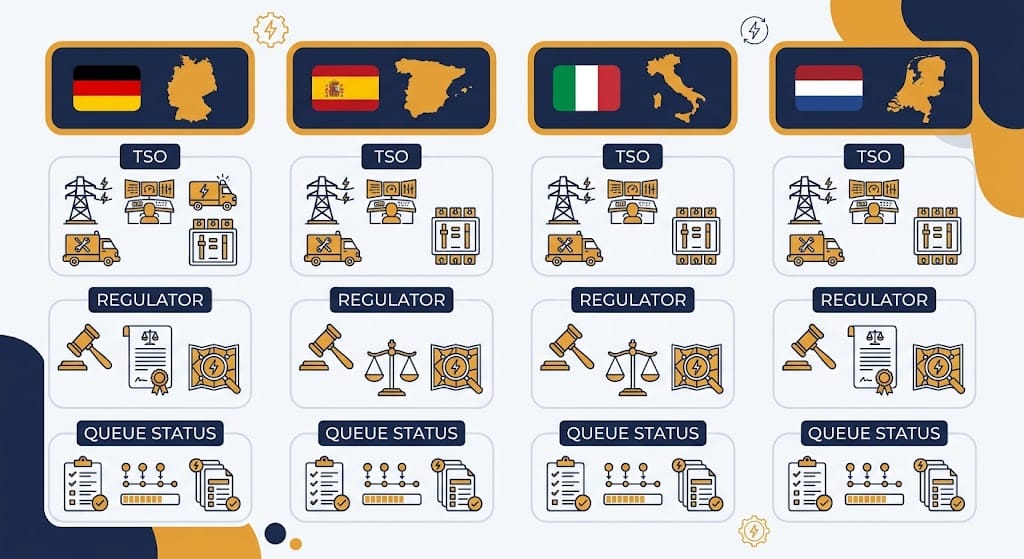
| Country | Transmission operator | Main connection issue | Check first |
| Germany | 4 regional TSOs | High application volume, new maturity-based allocation | Applicable TSO’s current process and connection point |
| Spain | REE | Unsettled storage-access rules, large pending pipeline | REE/DSO access capacity and current permit route |
| Italy | Terna + regional DSOs | Capacity allocation via new microzone system | Connection voltage and responsible operator |
| Netherlands | TenneT + regional DSOs | Widespread congestion (netcongestie) | Firm versus flexible capacity options |
The Common Thread Across These Europe BESS Grid Connection Markets
Germany, Spain, Italy, and the Netherlands look different on the surface. Each has its own TSO structure, its own national code, and its own institutions. But they share a pattern worth noticing. Across all four, high volumes of storage and hybrid-project applications have increased pressure on connection processes. Network operators are increasingly using readiness evidence, technical feasibility, conditional-access arrangements, or other prioritisation tools, rather than relying solely on application date. The details differ materially by country and operator, and some of these changes are still being finalised as this guide is written.
For developers, that means two things. First, don’t plan a European BESS project around queue rules you read about even a year ago; they may already be out of date. Second, a project’s evidence of real readiness, land control, permits, financing, and validated technical models, increasingly matters as much as when it first applied.
Common Risks in a Europe BESS Grid Connection
Most delays in a Europe BESS grid connection trace back to a small set of repeat mistakes. So here is how to catch them early.
| Risk | Consequence | Mitigation |
| Assuming one EU-wide threshold or process applies | Wrong compliance pathway assumed early | Confirm the national RfG type and process with the specific TSO or DSO |
| Relying on outdated queue-rule guidance | Schedule built on a process that no longer applies | Check current queue and prioritisation rules directly with the network operator |
| Selecting a site before checking congestion status | Non-firm terms or multi-year delay | Screen the country’s current congestion and queue data early |
| Incomplete or unvalidated dynamic models | Delayed studies and commissioning rework | Require validated models from the PCS vendor and integrator |
| Treating national code compliance as an afterthought | Design changes late in development | Confirm the applicable national grid code early in concept design |
| Assuming permitting and connection run on the same timeline | Land, environmental, or planning delays block an otherwise-ready connection | Run permitting and connection work in parallel from the start |
Planning a BESS project in Europe? Start with a country-specific connection-readiness assessment. Cover the applicable RfG type, national grid code, current queue status, and permitting timeline, before you finalise equipment specifications.
Frequently Asked Questions About a Europe BESS Grid Connection
Common questions developers ask before choosing a European market or signing a connection agreement.
Does one EU grid code cover every country?
No. RfG sets a common EU-wide baseline, classifying projects into Types A to D. But each country implements it through its own national grid code, which can add significant detail, as Germany’s VDE-AR-N series shows. Confirm the national code alongside RfG, not instead of it.
Is the UK covered by this Europe BESS grid connection guide?
No. The UK sits outside the EU and follows its own framework, built around NESO, the Grid Code, and Engineering Recommendations G98/G99/G100. See our dedicated UK guide for that detail.
Which European countries have the longest BESS connection queues right now?
Germany, Italy, Spain, and the Netherlands have all reported connection queues many times larger than their official capacity targets. Each has introduced new prioritisation rules within the past two years to manage this, so treat queue length as a moving target, not a fixed number.
Does battery storage get classified the same way as solar or wind under RfG?
Often, but not automatically. Many national frameworks apply Type A-D-style requirements to BESS when it exports to the grid, but the applicable classification can depend on the country, operating mode, hybrid configuration, and connection arrangement. Confirm the route with the connecting TSO or DSO.
Why do Germany, Italy, and the Netherlands all have such large storage queues?
Developers in each market applied for far more grid capacity than the underlying network was planned to carry. Partly, that happened because reserving a queue position cost little relative to a project’s potential value. All three countries have since introduced readiness or maturity-based rules to filter for projects genuinely likely to proceed.
Can a battery help resolve grid congestion instead of just adding to it?
In some markets, yes. The Netherlands’ congestion-mitigator framework, for example, lets a battery accept flexible or conditional access in exchange for helping manage congestion at the network operator’s request. Similar flexible-connection concepts are emerging elsewhere in Europe too.
How long does a Europe BESS grid connection take?
It varies enormously by country and by position in the relevant queue or pipeline. A small distribution-connected project can sometimes progress in months. A large, transmission-connected project in a congested market can take years, particularly in markets still working through a legacy backlog.
Do I need compliance certification before energising?
In many European countries, yes, particularly for larger or higher-type projects. Requirements vary by country and by RfG type, so the specific certification and testing route is best set early, with the connecting network operator.
Glossary of Terms for This Europe BESS Grid Connection Guide
Because this guide spans several countries, here are the key terms and institutions, defined in plain terms.
EU-Level Terms and Institutions
RfG — Requirements for Generators — Regulation (EU) 2016/631, the EU network code establishing baseline requirements for connecting Power-Generating Modules. National frameworks may apply related requirements to battery storage depending on the project’s operating mode and connection arrangement.
ENTSO-E — European Network of Transmission System Operators for Electricity — coordinates technical implementation of RfG and related codes across national TSOs.
ACER — EU Agency for the Cooperation of Energy Regulators — recommends network codes and coordinates national energy regulators.
PGM — Power-Generating Module — a generating unit or group of generating units covered by the applicable connection requirements. Under RfG, PGMs are assigned Type A, B, C, or D requirements according to the applicable capacity, voltage, and national criteria.
Synchronous area — A group of interconnected power systems operating in synchronism at the same nominal frequency. RfG thresholds may differ by synchronous area.
National Institutions Referenced in This Guide
TSO — Transmission System Operator — the national (or, in Germany, regional) body that owns and operates the high-voltage transmission grid.
DSO — Distribution System Operator — the regional or local body that owns and operates the lower-voltage distribution network.
Bundesnetzagentur — Germany’s national energy regulator, which oversees grid connection rules and the country’s four TSOs.
CNMC — Spain’s national markets and competition regulator, which approves technical criteria for grid access alongside REE.
ARERA — Italy’s national regulator for energy, networks, and the environment, which sets connection rules through the TICA.
ACM — The Netherlands’ Authority for Consumers and Markets, which regulates grid congestion and connection-priority rules.
Important: This guide is general information, so treat it that way, not as legal, engineering, or connection advice. Grid-compliance requirements vary by country, network operator, project design, and the applicable rules at the time of assessment. Several of the markets covered here are actively reforming their connection processes. Confirm requirements with the relevant national TSO or DSO, national regulator, and qualified electrical, grid-connection, and legal advisers.
Further Reading on Europe BESS Grid Connection
More Sunlith Energy guides on battery storage connection, interconnection, and compliance.
- BESS interconnection process (BESS Interconnection Process: From Application to Commercial Operation)
- Global BESS grid-code requirements (BESS Grid Codes and Compliance)
- UK BESS grid connection process (UK BESS Grid Connection: G98, G99, NESO and Grid Code Guide)
- Australia BESS grid connection process (Australia BESS Grid Connection: AEMO, TNSP and DNSP Requirements)
- PCS fault ride-through and LVRT/HVRT capability (Fault Ride-Through Features: The PCS Hardware and Control Functions Behind LVRT/HVRT Compliance)
Source
The EU-wide framework detail in this guide is grounded in the EU’s RfG regulation text.